How the Brain works
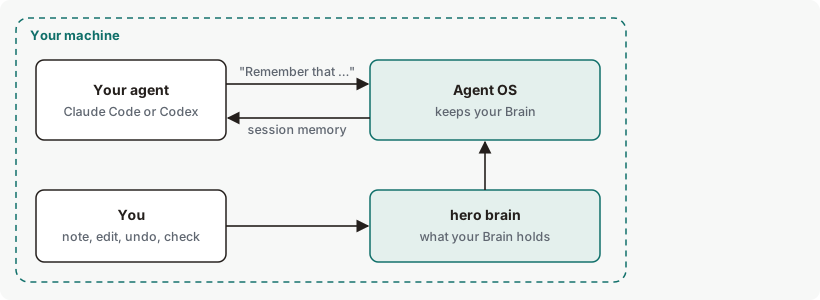
The Brain is what Ekamyth Agent OS keeps about you and your work, on your machine: who you are, the facts you've asked it to remember, your projects, and any threads of work saved there. Agent OS gives the part that fits your project to Claude Code and Codex when each session starts.
How does the Brain work?
Agent OS gives your agent the part of your Brain that fits the current project when a session starts. Memory is one part of the Brain: the facts you state. The Brain also holds your identity file, your project files and saved threads.
You add to it by starting a prompt with "Remember that …" in Claude Code or Codex, by running hero brain note, or by editing its files. Agent OS checks that what you said is a fact worth keeping, keeps it, and answers with one line that names where it went and the command to undo it. When a session starts, Agent OS gives your agent the part of your Brain that fits the current project, as context, and says what it left out. hero setup turns this on for both agents.
The Brain keeps facts, not rules
A "Remember …" prompt that reads as a rule, such as "Remember: never push to main", is treated as a rule, not kept in your Brain, and the reply starts Brain: sent to rules;. hero brain note doesn't keep rule-shaped text, and tells you to add it to your rules. To see how rules reach your agent, see How context loading works.
Threads
A thread is a named, versioned checkpoint of work in one workspace. The commands for it are on hero brain threads. Thread commands refuse until an agent identity is enrolled.
Moving work between Claude Code and Codex
A thread lets you save a checkpoint of your work in one agent and pick it up in the other. A checkpoint holds the objective, constraints, decisions, open questions, completed work, blockers, a short summary of recent work and the next action. It isn't a transcript.
Inside your agent, ask for it with /hero:brain in Claude Code, or the hero-brain skill in Codex. hero setup installs both, and your agent runs the commands below for you. From your own terminal, the steps are:
- Enroll an agent identity, once:
hero identity enroll --use-personal-brain. Check it withhero identity status. - Create a thread in the workspace you choose:
hero brain threads create --title <title> --workspace <path>. - Save a checkpoint from the agent you're in:
hero brain threads save --thread <thread-id> --expected-version <n> --source-surface claude --input <file>. Usecodexwhen you save from Codex, and--input -to read the checkpoint from standard input.<n>is the thread's current version,0for a new thread. A save against an older version is refused, so newer work is never overwritten. - In the other agent, list your threads with
hero brain threads list, then load one:hero brain threads resume --thread <thread-id> --target-surface codex. Useclaudeto resume in Claude Code.
A resume prints Loaded checkpoint from <time> (version <n>). and Work after this save is not included. Workspace files and permissions are not restored. Your agent reads the checkpoint as context, not as instructions.
A checkpoint holds up to 64 KiB, and a thread keeps up to 50 versions. Threads stay in this Agent OS install on this machine, and don't sync to another machine.
Brain concepts
| Term | What it means |
|---|---|
| Brain | What Agent OS keeps about you and your work. There is one Brain per Agent OS install, used by Claude Code and Codex. |
| Memory | The facts you've stated, one per line, in your memory file. It is one section of the Brain, never the whole Brain. |
| Section | One part of the Brain: identity, memory, projects, areas, resources and archive. hero brain status lists every section and whether its file exists. |
| Pinned section | A section the Brain expects to have. Identity and memory are pinned, and hero brain doctor reports either one when its file is missing. |
| Session memory | The block of Brain context your agent gets when a session starts. It is headed as context only, not instructions or rules. |
| Undo id | The id Agent OS gives each line it keeps, so you can take that line back with hero brain undo. |
| Thread | A named, versioned checkpoint of work in one workspace, saved only when you ask. See Threads. |
| Agent identity | The local agent id your threads are saved under. It grants no permissions. Thread commands refuse until an identity is enrolled; see hero identity. |
How the Brain chooses what your agent sees
Agent OS chooses session memory once, when the session starts, by the project the session opened in. It doesn't choose again for each task or prompt.
| What it considers | What happens |
|---|---|
| Your identity, memory and project files | Lines that fit the current project go in. Lines for other projects, junk lines, and duplicate or replaced lines are left out, and counted. |
| What you ask it to keep | It refuses secrets, junk such as pasted terminal output, text over its length limit and lines your Brain already has. A new fact about the same subject replaces the older line. A fact about "this project" goes to that project's own file. |
| Your latest saved thread | When a saved thread is shown, it is the newest from any project, not only this one. |
| The budget | Session memory has a fixed budget for each agent. When something doesn't fit, the block says how many lines loaded and how many didn't, by reason, and names the full file. See Limits. |
| Rules | Never part of session memory. Your registered rules reach the session in their own block. In some projects the session-start rules block can be missing or incomplete. See How context loading works. |
You control what's in it: what you keep, edit or undo, and whether session memory and "Remember that …" are on. See What you can change.
What leaves your machine
Your Brain's files, which you can read and edit, and any saved threads are kept on your machine. Session memory becomes part of your agent's context, which your agent sends to your model provider under your own account. Each time Agent OS gives session memory, it keeps a local note with counts and a fingerprint, not the text. Agent OS reads session memory on your machine and does not itself upload it to Ekamyth. The text it selects becomes your agent's context, so don't rely on it staying away from your model provider. Separately, when you turn a rule into code, Agent OS sends a version of the rule with your literal values removed, not the rest of your Brain.
Nothing in the Brain expires on its own. hero prune cleans up old traces and model-call records and leaves your Brain's files alone.
When something goes wrong
A problem with the Brain never stops a session from starting. The session starts, and the session memory block says what went wrong.
| What happens | What you see | What happens to the work |
|---|---|---|
| A Brain file can't be read, isn't valid text, or is too large | The block reads Ekamyth Brain: memory could not be loaded (<reason>). | The session starts without session memory. Run hero brain doctor. |
| The Brain is empty | The block starts No memory yet: and names the file to add a line to. | The session starts as usual. |
| No agent identity is enrolled | The block says saved threads aren't shown. Thread commands refuse with identity_not_enrolled. | Session memory still loads. To enroll one, run hero setup. To check, run hero identity. With none enrolled it prints Not enrolled yet — run: hero identity enroll. |
| Memory is longer than the budget | A Brain: … lines loaded line with what wasn't loaded, and a [truncated: …] line naming the full file | The rest stays in your file and isn't in this session. |
| A fact isn't kept | One line saying why, such as Brain: not kept (too_long) or Brain: not saved: looks like a secret | Nothing in your Brain changes. |
| A pinned file is missing | hero brain doctor lists it, with the next step | Session memory loads what exists. |
The Brain on Claude Code and Codex
| Claude Code | Codex | |
|---|---|---|
| Session memory at session start | Yes, set up by hero setup | Yes. hero setup asks Codex to approve the hook. |
| Session memory budget | About 1,000 tokens | About 750 tokens |
| "Remember that …" | Yes | Yes |
What you can change in the Brain
| Setting | Default | Effect |
|---|---|---|
| Your Brain's files | Empty | What your agent gets. Edit them directly, or use hero brain note and hero brain undo. See Files. |
HERO_BRAIN_SESSION_MEMORY=off | On | Turns off session memory; the block then says so. It also turns off the rules block at session start. See Context loading. |
HERO_BRAIN_CAPTURE_OFF=1 | On | Stops "Remember that …" prompts from being kept. |
Set these in the environment that launches your agent, then start a new agent session. A variable in your shell profile doesn't reach an agent you open from the Dock or a desktop launcher; that launcher's environment has to supply it.
See the Brain for yourself
The note adds one line to your memory file, and the undo takes it back.
# Keep a fact, then read the undo id in the reply
hero brain note --scope user --section memory --text "The example-project codename is Bluefin."

# What your agent draws from, and when session memory was last given
hero brain effective
hero brain status

# Take the line back
hero brain undo <id>
For the output, see Example output.
Brain limits and next steps
| Limit | Behaviour | What to do |
|---|---|---|
| Example notes in the Portal | Opening the Brain page in the Portal can save its example notes as your own, so your agent reads them. | Edit or delete them on the Brain page. |
See Limits of hero brain.
Checked against Agent OS 0.1.36rc14 (build 599c5e120c18) on 17 Nov 2026.