hero govern
Shows your posture and your agents' recent tool-call decisions, and tests a tool call against your rules before your agent makes it.
What hero govern does
It answers one question: what did Ekamyth Agent OS allow, refuse and hold, and why? The default view names your posture, then lists recent decisions with refusals and holds first. hero govern test tells you what the hook would do with one tool call, without making it.
- Use it when you want to see what was refused or held, or check a tool call before you rely on a rule.
- Use something else when you want to see whether a rule is enforced (
hero enforce), register rules (hero init) or decide a hold (hero inbox). - Alias: none.
- Reads or changes:
status,list,testandcheckread only.initandaddchange your policy file.
On the default posture, a tool you declare with hero govern add isn't enforced: the call runs and is recorded. To add a rule that's checked as code, write it in your rules file and run hero init. It blocks once enforcement is on.
Synopsis for hero govern
hero govern [status] [--json | --details]
hero govern list [--json | --details]
hero govern test "<tool>:<target>"
hero govern test "<shell command>"
hero govern test --data "<text>"
hero govern check <kind>
hero govern level <surface>
hero govern init [--force] [--example [<name>]]
hero govern add <tool>[:<target>[:<stakes>]]
hero govern add --data-class <class>=allow | redact | block [--label <word>]
hero govern add --list-entry <class> "<term>" [--from <date>] [--until <date>] [--reason <text>]
hero govern add --release <id>
hero govern describe [--json]
hero govern help | -h | --help
Run with no subcommand, it behaves as status. Quote a test target that has spaces or a dash in it. Unquoted, hero govern test Bash:rm -rf / is refused with govern has no flag '-rf'.
Subcommands of hero govern
| Subcommand | What it does | Reads or changes |
|---|---|---|
status | Your posture, how many actions your policy declares, and recent decisions, refusals and holds first. This is the default. | Reads |
list | Every tool your policy declares, one per line, with its stakes and scope. | Reads |
test | Runs your policy and your rules against one tool call and says what the hook would do. It doesn't make the call. | Reads |
check | Says whether an action kind is covered. | Reads |
level | Shows the enforcement level for a surface, and any grant that lowered it. | Reads |
init | Writes a default policy file, then lists the rules now in force. | Changes |
add | Writes one entry into your policy file: a tool declaration, or a sensitive data policy entry. | Changes |
describe | The command's own descriptor. Reads none of your data. | Reads |
help | This command's help. Same as --help and hero help govern. | Reads |
Arguments for hero govern
Arguments for status and list
| Argument | Type | Required | Default | What it does |
|---|---|---|---|---|
--json | Flag | No | Off | Machine-readable output with data and envelope. |
--details | Flag | No | Off | Shows every shared number as numerator/denominator, with the reasons a figure is partial. |
check, level and test ignore --json. A refusal with --json prints one JSON object.
Arguments for test
| Argument | Type | Required | Default | What it does |
|---|---|---|---|---|
"<tool>:<target>" | Text | Yes, unless --data | None | The tool call to test: the tool's name, a colon, then what it acts on, for example "Write:BLOCKME.txt". For a shell command, the target is the command: "Bash:git push origin main". |
"<shell command>" | Text | No | None | A first word with a space in it is tested as a Bash call, so "git push origin main" is the same as "Bash:git push origin main". |
--data <text> | Text | No | None | Tests your sensitive data policy against a text instead. It never prints the values it finds. See Sensitive data policy. |
Arguments for check
| Argument | Type | Required | Default | What it does |
|---|---|---|---|---|
<kind> | Action kind | Yes | None | The action kind to check, such as shell or email.send. |
Arguments for level
| Argument | Type | Required | Default | What it does |
|---|---|---|---|---|
<surface> | Text | Yes | None | The surface to show. It prints the level, enforce, warn or off, and why. With no grant on record, the level is enforce. An expired grant goes back to enforce. |
Arguments for init
| Argument | Type | Required | Default | What it does |
|---|---|---|---|---|
--force | Flag | No | Off | Overwrites your policy file with the defaults. Without it, init changes nothing when a policy file that loads already exists, and says so. |
--example [<name>] | Name | No | None | Adds a shipped example sensitive data policy, and keeps the rest of your policy file. An existing data policy is replaced only with --force. With no name, it lists the examples. The build ships one, generic. |
Arguments for add
| Argument | Type | Required | Default | What it does |
|---|---|---|---|---|
<tool> | Tool name | Yes, for a tool rule | None | The tool or action the rule is for, such as Bash or Write. With nothing at all, it refuses with govern add needs <rule>. |
:<target> | Text | No | *, every target | What the rule applies to. |
:<stakes> | low, moderate, high, critical or unknown | No | The tool's stakes already in your policy file, if it has an entry; otherwise its shipped stakes, or unknown for a tool with none | How much the tool can do. A rule can raise a tool's stakes, never lower them below what ships. If the rule replaces an entry, add names the one it replaces and, when the stakes change, prints class: <old> -> <new>. With no stakes given and the same target already there, it changes nothing and says already present as <stakes> — no change. |
--data-class <class>=<action> | allow, redact or block | No | None | Sets what happens to a class of sensitive data. The generic example's classes are SECRET, RESTRICTED_TERM, CREDIT_CARD, US_SSN, IBAN_CODE, US_BANK_NUMBER, ABA_ROUTING_NUMBER, EMAIL_ADDRESS and PHONE_NUMBER. |
--label <word> | Text | No | None | With --data-class: the word shown for that class. |
--list-entry <class> "<term>" | Class and text | No | None | Adds a term of your own, such as a project code name, to a class. It prints only the entry's id, which starts with e_ and isn't made from the term. |
--from <date> | YYYY-MM-DD or YYYY-MM-DDTHH:MM:SSZ | No | Now | With --list-entry: when the entry starts to apply. |
--until <date> | YYYY-MM-DD or YYYY-MM-DDTHH:MM:SSZ | No | No expiry | With --list-entry: when the entry expires. |
--reason <text> | Text | No | None | With --list-entry: why it's there. |
--release <id> | Entry id | No | None | Releases a list entry early, and records who released it and when. |
hero govern describe also lists packs, raw and demo. They need an examples package that isn't installed, so they aren't documented here.
How hero govern gets its answer
status and list read your posture, your policy file and the record of decisions on your machine. test runs the same check the hook runs, against your policy and your registered rules, for one tool call you describe. It makes no call and changes nothing in your files. init and add write your policy file. For the full path, see How Governance works.
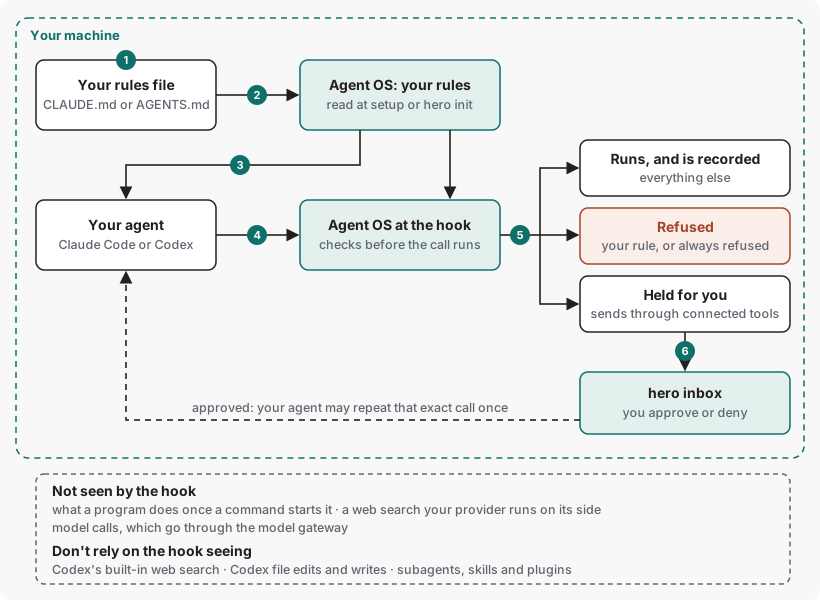
hero govern shows and tests.Get started with hero govern
Before you start: Agent OS is installed and hero setup has run.
See your posture and recent decisions.
hero governYou should see your posture, and decisions or
no decisions recorded. See Example output.See what your policy declares.
hero govern listYou should see one tool per line, with its stakes. See Example 1.
Test a tool call.
hero govern test "Bash:ls"You should see
result: OBSERVEDandThe hook lets this call RUN and records it.See Example 2.
Nothing here changes your work, so there's nothing to undo.
Example output of hero govern
Before hero setup
Example output. The format is the command's; the numbers are examples.
Govern · not wired — no Ekamyth hook or proxy acts on the policy here
  No policy of your own (governed_capabilities —)
  Nothing stops your agent's calls until it is wired. Declare your policy to
    decide what runs, what waits for approval, and what is refused.
  Run: hero setup
Nothing is checked until hero setup has run. Run it, as the last line says.
After setup, before any decisions
Example output. The format is the command's; the numbers are examples.
With decisions
Output from version 0.1.36rc13. Trimmed where you see …
The command still prints governed_capabilities, Act gate and the reason authenticated autonomy grant required. They are the command's own words.
How to read hero govern output
| Line | What it means | What to do |
|---|---|---|
| 1. Posture | Your posture. builder is the default: it records all calls, refuses a short list of dangerous actions and holds sends through connected tools. | Nothing. |
| 2. Declared | How many tools your policy file names. hero govern list shows them. | Declared permissions are recorded in your policy; check hero govern status for the current enforcement posture. |
| 3. Declared, not enforced | On this posture, the tools your policy declares run and are recorded. Rules from your rules file are still checked as code (they block when enforcement is on), and holds still apply. | To add a rule that's checked as code, use your rules file and hero init. |
| 4. No decisions recorded | No governed tool call has been recorded. | Use your agent, then run this again. |
| 5, 8. Run | One command to run next. | Run it. |
| 6. Last decisions | How many recent decisions were allowed, refused and held. Held ones wait in hero inbox. | If any are held, run hero inbox. |
| 7. Decision table | When, in UTC; the decision (✗ refused or ⚠ needs approval, which is a hold); the tool; and why. blocked by your rule <id> names the rule from your rules file, once enforcement is on. | For a rule's detail, run hero enforce show <id>. For a hold, run hero inbox. To see the call itself, replay the session with hero trace show <id>. |
| 7. "authenticated autonomy grant required" | The reason printed for a hold. No command issues such a grant. | Decide the hold with hero inbox approve or deny. |
| 9. Policy | The policy that decided, and how to test a call. | No action is required for this line alone. |
More hero govern examples
Example 1. To see what your policy declares
hero govern listExample output. The format is the command's. Excerpt: the first lines.
govern — builder
  Agent                       stakes moderate scope *
  AskUserQuestion             stakes low    scope *
  Bash                        stakes critical scope *
  Edit                        stakes high   scope *
  Glob                        stakes low    scope *
  Grep                        stakes low    scope *
  MultiEdit                   stakes high   scope *
  NotebookEdit                stakes high   scope *
  Read                        stakes low    scope *
  SendMessage                 stakes low    scope *
  SubagentHandback            stakes low    scope *
  Task                        stakes moderate scope *
With no policy file yet, it prints no capabilities declared — hero govern init.
Each line is a tool, its stakes and its scope. * means every target. Stakes decide what a call needs: low runs; moderate needs your approval until the agent has earned autonomy for it, then runs without asking; high needs your approval in hero inbox; critical and unknown are never allowed automatically, and each call needs a person's approval. What the default posture does with each is in the order checks run in.
Example 2. To test a tool call
hero govern test "Bash:ls"Example output. The format is the command's; the numbers are examples.
  govern test — dry-run against ~/.hero/govern.json
  posture: BUILDER (observe) — builder posture: records all calls; stops a short list of catastrophic actions
  tool call:  Bash:ls
  your rules: none registered
  result:     OBSERVED
  reason:     In your current setting, this runs and is recorded.

  → The hook lets this call RUN and records it.
your rules says whether a rule from your rules file matches. result is the hook's answer, and the last line says it in words:
| Result | Last line | Exit code |
|---|---|---|
ALLOW | → The hook ALLOWS this call. | 0 |
OBSERVED | → The hook lets this call RUN and records it. | 0 |
NEEDS-APPROVAL | → The hook HOLDS this call for approval (hero inbox). | 0 |
DENY | → The hook REFUSES this call. | 1 |
For example, hero govern test "Bash:rm -rf /" and hero govern test "Bash:cat ~/.ssh/id_rsa" both read DENY. With no policy file yet, a first line says the hook installs the default policy on its first call, that this is what it would decide then, and that nothing was written.
Example 3. To see what the default posture does with a declared tool
hero govern test "Write:BLOCKME.txt"Example output. The format is the command's. Excerpt.
  posture: BUILDER (observe) — builder posture: records all calls; stops a short list of catastrophic actions
  your rules: none match
  result:     OBSERVED
  reason:     high-stakes, authenticated autonomy grant required
  policy:     NEEDS-APPROVAL — declared, not enforced in this posture
  → The hook lets this call RUN and records it.
This is before Example 4: the reason line shows Write at high stakes, and Example 4 raises it to critical.
The policy line is what your policy file would ask for. On the default posture it's declared, not enforced, so the call runs.
Example 4. To declare a tool in your policy file
This command will:
- Write a rule for
WriteonBLOCKME.txt, atcriticalstakes, into your policy file. - On the default posture, change nothing about what runs.
hero govern add Write:BLOCKME.txt:criticalExample output. The format is the command's; the numbers are examples.
  replaces: Write:* (high)
  class: high -> critical
govern add — Write:BLOCKME.txt (critical) written to ~/.hero/govern.json
  test:      hero govern test Write:BLOCKME.txt
  activate:  register 'hero hook claude' in your surface settings.json
Run it from your own terminal. From inside an agent session, in CI, or with no terminal, it's refused. hero setup already registered the hook, so the activate line needs no action. To undo, edit your policy file and remove the rule.
Example 5. To check whether an action kind is covered
hero govern check shellExample output. The format is the command's.
govern check shell: refused — action kind not yet observed by the edge scan (unobserved is never silently allowed)It exits 1. This answer is for you only. Nothing is refused at run time because of it.
Example 6. To write a default policy file
This command will:
- Write a default policy file. If your current one can't be enforced, it keeps it beside the new one and says where.
- In a terminal, ask whether to open the new file in your editor.
hero govern initWhen a policy file that loads already exists, it changes nothing:
Example output. The format is the command's.
govern.json already exists: ~/.hero/govern.json
  edit it directly, or pass --force to overwrite with defaults
Example 7. To use the view in a script
hero govern --jsonThe data object includes govern_posture, declared_capabilities, capabilities (each with name, stakes and scope), decisions and decisions_tally (allowed, refused, held).
Sensitive data policy
A sensitive data policy allows, redacts or blocks cards, IDs, credentials and terms of your own before a message leaves your machine. It does nothing until you add one, with hero govern init --example generic or hero govern add --data-class. To try it on a text without sending anything:
hero govern test --data "<text>"With no data policy yet, it prints govern test — no data policy section; nothing is scanned.
Exit codes and errors for hero govern
| Code | Meaning | What to do |
|---|---|---|
0 | The output asserts a positive result, or is advice with no verdict. | Nothing. |
1 | A truthful negative result: test reads DENY, an action kind isn't covered, no example has that name, or a data policy edit couldn't be made. | Read the output. |
2 | Refused: unknown flag or subcommand, missing argument, an invalid rule, a rule below a tool's floor, or a change attempted from inside an agent session, in CI or with no terminal. | Check the synopsis and the errors below. |
3 | A source it needs is unavailable at runtime. | Email support at the address in your welcome email, with the output you saw. |
| Error | Cause | Fix |
|---|---|---|
refused govern add needs <rule> | add with nothing after it. | Give a rule, such as Bash:*:high. |
error: rule must name a tool/action, e.g. hero govern add Bash:*:high | The rule starts with a colon. | Start it with a tool name. |
error: '<stakes>' is a class, not a target — did you mean hero govern add <tool>:*:<stakes>? | Stakes were given where the target goes. | Use the form it suggests. |
error: unknown stakes '<word>' — must be one of low, moderate, high, critical, unknown | A stakes word that isn't in the list. For medium, it adds did you mean 'moderate'? | Use one of the listed words. |
error: <tool> cannot be filed '<stakes>' — its floor is '<stakes>', and a declaration may raise a verb's tier, never lower it. | The rule would lower a tool's stakes below what ships. | Use the form it prints, or approve one call with hero inbox. |
refused `hero govern add <rule>` switches off rules, and it was launched from inside a Claude Code session, not from your terminal. A governed agent cannot switch off its own rules | The command was run from inside an agent session. | Run it yourself in your own terminal, as the remedy line says. |
No example named "<name>". Run hero govern init --example to list them., then To add an industry configuration: hero configuration add <file> | No shipped example has that name. | Run hero govern init --example to list them. |
govern has no flag '<flag>' | An unknown flag, or a test target with a dash that isn't quoted. | Quote the target, or check the synopsis. |
hold is not available in this version; use allow, redact or block. | --data-class was given hold. | Use allow, redact or block. |
--from '<value>' is not a date (YYYY-MM-DD or YYYY-MM-DDTHH:MM:SSZ); nothing was changed | A date in another form. --until gives the same. | Use one of the two forms. |
no govern document at <path> yet — run hero govern init first; nothing was changed | A data policy edit with no policy file. | Run hero govern init. |
<path> already has a data_policy section; pass --force to replace it | init --example when a data policy exists. | Add --force to replace it. |
Files and environment for hero govern
| Name | Kind | Purpose |
|---|---|---|
~/.hero/govern.json | File, read; written by init and add | Your policy file: the tools it declares, their stakes, and any sensitive data policy. You can edit it. An agent can't: editing it is on the always-refused list. |
~/.hero/posture.json | File, read | Your posture. |
HERO_HOME | Environment variable | Root of those files. Default ~/.hero. |
Limits of hero govern
| Limit | Behaviour | Can you change it? | What to do |
|---|---|---|---|
Tools declared with hero govern add | Declared, not enforced on the default posture. The call runs and is recorded. | Yes | For a rule that's checked as code, write it in your rules file and run hero init. It blocks once enforcement is on. |
check | Answers only when you ask. Nothing is refused at run time because of it. On a fresh install it reads refused for every kind. | No | Run hero govern and hero setup --check. A tool in your policy isn't proof that anything intercepts it. If it isn't wired, run hero setup. If your policy file is broken, run hero govern init; it keeps the old file beside the new one. A tool whose calls never reach the hook stays uncovered, however you declare it. |
| The help's name line | Says least-privilege and fail-closed. On the default, Builder, calls your rules don't cover still run and are recorded, and only a short list is refused. | No | Read your posture on line 1 of hero govern. |
| Options in the help | hero govern --help doesn't list the options of init, add and test. | No | Use the Arguments on this page. |
| Two default policies | The policy hero govern init writes isn't the one the hook installs on its first call. It declares fewer tools and files some at lower stakes, so init --force doesn't go back to what list showed. | No | Edit your policy file instead of resetting it. |
Before hero setup | Nothing is checked. hero govern reads not wired. | Yes | Run hero setup. |
| What the always-refused list reads | It refuses the plain catastrophic forms, such as a forced recursive delete of your home or credential folders, writes into LaunchAgents, and edits to Agent OS's own settings. It doesn't yet read indirect forms: a dangerous command on its own line after a harmless one, a script written then run, a program that runs a delete for you, wildcard deletes or edits of files (including your project's CLAUDE.md or hook files), plist editors such as PlistBuddy or plutil, a download piped into a shell (curl … | sh), or rm -r without -f. On the default posture these reach your agent's own permission prompt, and rules you register don't cover them. | Yes: the Enforce posture holds every action for your approval | Review your agent's permission prompts for these forms. |
| Claude Code's Read, Grep, Write and Edit | These tools are checked less closely than shell commands. They can read secret files, such as SSH or cloud keys, on any posture, and on the default posture they can change or empty Agent OS's own hook, rule and record files. A search across a whole credential folder, with Grep or with grep -r in the shell, isn't blocked. | No | Review your agent's permission prompts for these tools. |
| Browser actions | On the default posture, browser actions on signed-in sites, such as Pay, Send, Publish or Delete, aren't held. | No | Confirm those actions yourself. |
| Claude Code's check time limit | If Claude Code times out or stops Agent OS's check on a tool call, that one call runs unchecked; Codex holds the call instead. Claude Code allows a check 15 seconds. With very large rule registries, over about 20,000 rules, one check can take longer than that. A registry of a few hundred rules checks in about 2 seconds. | No | Keep your registry to the rules you need. |
| Wording in the output | Some lines use internal terms, such as governed_capabilities and Act gate. | No | None. |
Commands related to hero govern
Checked against Agent OS 0.1.36rc14 (build 599c5e120c18) on 17 Nov 2026.