hero init
Registers the rules in a rules file, and tells you what each one is doing.
What hero init does
It answers one question: does Ekamyth Agent OS hold my agent to the rules in this file? It reads a markdown rules file, such as CLAUDE.md or AGENTS.md, registers each rule, and prints each rule's state. A rule in a shape Agent OS can check as code is checked at the tool call from then on: on Claude Code, and for shell commands on Codex. It blocks once enforcement is on.
- Use it when you add rules to a file, change or remove one, or want rules from a file that
hero setupdidn't read. - Use something else when you want to see every rule and what it's doing (
hero enforce) or test one tool call (hero govern test). - Alias: none.
- Reads or changes: changes. It updates the rules Agent OS checks. It never edits your rules file.
hero setup lists the rules in the project you run it from, but a rule it only listed isn't enforced until you run hero init on its file. Run hero init for each rules file, and each time you edit one.
Synopsis for hero init
hero init <file>
hero init <file> --confirm=<rule> [--confirm=<rule> ...]
hero init --help | -h | help
hero help init
The file is the first argument that doesn't start with -, so put it first: hero init --confirm x CLAUDE.md reads x as the file. Other flags, --json included, are ignored without a message. There is no JSON output.
Subcommands of hero init
None. hero init takes a file.
Arguments for hero init
| Argument | Type | Required | Default | What it does |
|---|---|---|---|---|
<file> | File path | Yes | None | The rules file to read: CLAUDE.md, AGENTS.md or any markdown file. With no file, it prints the usage and exits 1. |
--confirm=<rule> | Rule id. Repeatable | No | None | Accepts the change or removal of that rule when an agent edited the file. hero init prints this exact form when it needs it. Only the = spelling works: --confirm <rule> confirms nothing. Run it from your own terminal; from inside an agent session it's refused. |
How to write a rule hero init reads
A rule is one line: a list item (-, *, + or 1.), or a sentence that starts with a directive word such as Always, Never, Don't, Do not, Avoid, Prefer, Use, Keep, Ensure, Make sure, Must or Only. Headings, tables, blockquotes, fenced code, front matter and - [ ] checkboxes aren't read. A wrapped line is joined to the line above it.
Each rule gets an id made from its first words, such as never-push-to-main. To give a rule an id of your own, start it with the id in square brackets: - [no-force] Never force-push to main. An id uses letters, digits, ., _, : and -. A rule with its own id keeps that id when you reword it.
# Project rules

- Never push to main.
- Never run git reset --hard.
- Keep replies to the point.
The first two are mechanical and are checked as code at the tool call. They block once enforcement is on. The third is judgment: it isn't checked as code, and Agent OS's memory puts it in your agent's context when it applies. For the shapes Agent OS can check as code, see Rules checked as code.
How hero init registers your rules
hero init reads the file on your machine, sorts each rule as mechanical or judgment by its wording, and adds it to the rules Agent OS checks. From the next tool call, a mechanical rule is checked as code at the hook on Claude Code, and for shell commands on Codex. From the next session, your registered rules reach the agent at session start. In some projects the session-start rules block can be missing or incomplete. For the full path, see How Governance works.
When you run it again on the same file:
- Nothing changed: the same output, and nothing changes.
- A new line adds a rule.
- A reworded line with an id made from its words becomes a new rule, and the old one is treated as removed. A reworded line with its own id keeps its id and takes the new words.
- A line removed from every file it was in: a deleted rule line can stay active until you run
hero codify off <rule>. See Removing a rule. If the rule is still in another file, it stays active, andhero initsays which file still has it.
An agent can add a new rule this way. It can't change, widen or retire one. Inside an agent session, or when an agent edited the file, the old rule stays active and hero init prints the --confirm command for you to run from your own terminal. The same applies when Agent OS can't tell whether an agent edited the file.
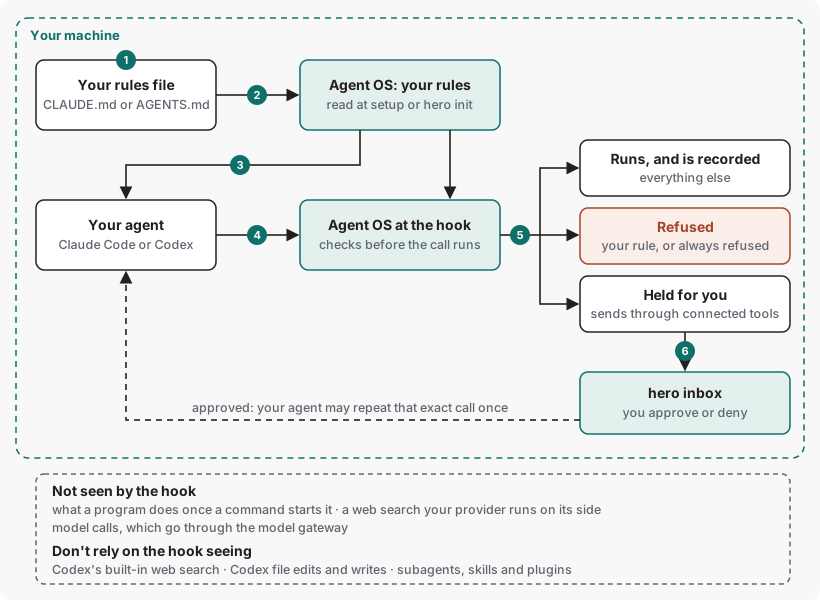
hero init does.Get started with hero init
Before you start: Agent OS is installed and hero setup has run. Work in a project you can test in, and run each command from that project's folder: the states depend on the folder you run from.
See the rules Agent OS already has.
hero enforceYou should see a summary line and one row per rule, or a line saying no rules were found. See hero enforce.
Add two rules to your rules file.
This command will:
- Add two lines to the end of
CLAUDE.mdin this folder, creating the file if it doesn't exist.
printf '%s\n' '- Never push to main.' '- Never run git reset --hard.' >> CLAUDE.md- Add two lines to the end of
Register them.
This command will:
- Register every rule in
CLAUDE.mdwith Agent OS. - Start checking tool calls against the two new rules as code, on Claude Code and, for these shell commands, on Codex.
hero init CLAUDE.mdYou should see both rules with the status
Enforcedand the typeCode. See Example output.- Register every rule in
Check one rule on both agents.
hero enforce show never-push-to-mainYou should see
ENFORCED AS CODEon the Claude Code and Codex lines. See hero enforce show.
To undo: a deleted rule line can stay active until you run hero codify off <rule>. See Removing a rule.
Example output of hero init
Two mechanical rules and a judgment rule
Output from version 0.1.36rc13. Trimmed where you see …
A judgment rule
Output from version 0.1.36rc13. Trimmed where you see …
How to read hero init output
| Line | What it means | What to do |
|---|---|---|
| 1. Initialized | How many rules were read from the file, and where Agent OS keeps your registered rules. | If the count is lower than you expect, check that each rule is one line in the rule format. |
| 2, 3. Rule, status and type | Each rule's id, its status and its type. Code is a mechanical rule. LLM is a judgment rule, and its row adds no LLM check runs before work yet, which means no check runs at the tool call for it; Agent OS's memory puts it in your agent's context when it applies. Use the id with hero enforce show. | See the statuses below. |
| 4. Summary | How many of this file's rules are Enforced and how many are Broken — no seam, then how many are Code and LLM. | Check any rule that isn't Enforced. |
| 5. Guidance line | Printed when one or more rules are judgment rules. Judgment rules aren't checked as code, by design. Agent OS's memory puts the ones that apply in your agent's context. | To have a rule checked as code, reword it into one of the shapes Agent OS can check as code. |
| Status | What it means | What to do |
|---|---|---|
Enforced | A mechanical rule (type Code). It is checked as code at the tool call on Claude Code, and for shell commands on Codex. It blocks once enforcement is on. | Nothing. |
Broken — no seam | A judgment rule (type LLM). The label means there's no code check at the tool call for it, which is how judgment rules work. Agent OS's memory puts the judgment rules that apply in your agent's context. | To have it checked as code, reword it into one of the shapes Agent OS can check as code. |
Two more lines can appear:
waiting for you — '<rule>' (<id>) was removed from <file> …, or… was changed in <file> …: an agent session ranhero init, or an agent edited the file, so the old rule stays active. Run the--confirmcommand it prints, from your own terminal.retired — removed from <files>: '<rule>' (<id>) no longer blocks: the line the product prints when a rule is gone from every file. A deleted rule line can stay active. See Removing a rule.you removed '<rule>' from <file>; still in <other files> — it keeps blocking.: remove it from the other file too, then runhero initon that file, as the line says.recorded the source's scope on <n> previously unscoped rule(s): those rules now apply only in this file's project.
More hero init examples
Example 1. To register Codex's rules file
hero init AGENTS.mdThe output has the same format as Example output. A rule in both CLAUDE.md and AGENTS.md is registered once, with both files as its source. Run hero init once for each file. Inside an agent session, adding a rule that's already in another file is refused, because it would widen where the rule applies; run it from your own terminal.
Example 2. To retire a rule
A known issue means a deleted rule line can stay active until you run hero codify off <rule>. See Removing a rule.
Example 3. To accept a change an agent made to your rules file
When an agent session removes or changes a rule, hero init keeps the old rule and prints a line like this:
Example output. The format is the command's; the numbers are examples.
waiting for you — 'Do not edit files under vendor/.' (do-not-edit-files) was removed from CLAUDE.md inside an agent session, so it keeps blocking until you confirm. Only you can retire a rule; from your own terminal: hero init ~/example-project/CLAUDE.md --confirm=do-not-edit-filesRun the command it gives, from your own terminal:
hero init ~/example-project/CLAUDE.md --confirm=do-not-edit-filesExit codes and errors for hero init
| Code | Meaning | What to do |
|---|---|---|
0 | The rules were registered, including when a removal or change is held with a waiting for you line. | Read the states and any waiting for you line. |
1 | Nothing was registered: no file given, the file wasn't found or couldn't be read, no rules were found, an id was invalid or already used, or the update failed. | See the errors below. Your registered rules are unchanged. |
2 | Refused: --confirm was run from inside an agent session. | Run it yourself in your own terminal. |
| Error | Cause | Fix |
|---|---|---|
usage: hero init <memory.md> | No file was given. | Name a rules file. |
init: <file> not found in <folder>, followed by next: create <file> here with your agent's rules, one per line … | The file isn't in that folder. | Check the path, or create the file. |
init: cannot read <file>; no changes made (<reason>) | The path is a folder, or the file can't be opened, or isn't UTF-8 text. | Name a file, and check its permissions and encoding. |
init: no rules found; no changes made, then a line explaining what a rule is | No line in the file is in the rule format. | Write each rule as one line. See the format. |
init: duplicate rule id '<id>' at lines <n> and <m>; no changes made | Two lines give the same rule id. | Remove or reword one of them. |
init: invalid rule id '<id>' at line <n>; use letters, digits, '.', '_', ':', or '-'; no changes made | An id in square brackets uses other characters. | Use only the characters it lists. |
init: stable rule id '<id>' is already owned by <files>; refusing reuse by <file>; no changes made | Another file uses the same id with different words. | Pick a different id, or make the words match in both files. |
init: existing rule registry is unreadable; no changes made (<reason>) | Agent OS's registered rules can't be read. They're left as they were. | Restore them from a backup, or move the file it names aside and run hero init again for each rules file. |
init: rule registry update failed; prior registry preserved (<reason>) | The update couldn't be saved. Inside an agent session, this is also what you see when the change would widen or alter a rule. | Run the same command yourself in your own terminal. Otherwise, check disk space and permissions. |
Files and environment for hero init
| Name | Kind | Purpose |
|---|---|---|
Your rules file, such as CLAUDE.md or AGENTS.md | File, read | Where you write rules. hero init never changes it. |
HERO_HOME | Environment variable | Root of Agent OS's files. Default ~/.hero. |
Limits of hero init
| Limit | Behaviour | Can you change it? | What to do |
|---|---|---|---|
| Rules checked as code | Only rules in the seven shapes are checked as code at the tool call. They block once enforcement is on. | No | Reword a rule into one of them. |
| Judgment rules | Not checked as code, by design. Agent OS's memory puts the ones that apply in your agent's context, as guidance. | No | A rule that reports no LLM check runs before work yet needs nothing from you. To have it checked as code, reword it into one of the shapes Agent OS can check as code. |
| Exceptions in a rule | Only "never edit files under X, except Y" reads its exception. Other exceptions are read the wrong way round: "Never run any command except make" is read as forbidding make and allowing everything else. | No | Write exceptions only in that form. |
| Shell commands it can't fully read | Refused. This includes some ordinary commands, such as quoted heredocs and some pipelines. | No | Run that command yourself in your own terminal. |
| The same rule, found again by discovery | A rule you registered with hero init can be listed a second time, under another id, when Agent OS discovers it in your rules files. | No | Still seen on version 0.1.36rc13: the same rule was listed under two ids, never-run-rm-rf and claudemd-never-run-rm-rf, and both fired on the same call. |
| A rule from a project's file | Applies to that project. | No | Put a rule in a project's file to limit it to that project. |
| Rules in a user-level file | Rules in ~/.claude/CLAUDE.md or ~/.codex/AGENTS.md aren't enforced on this release. | No | Put each rule you need enforced in the project's CLAUDE.md or AGENTS.md, then run hero init on it. |
Rules only hero setup found | Listed in hero enforce, but not enforced. | No | Run hero init on the file. |
| A folder rule ending in a period | In - Never change files under docs/legal., the period is read as part of the folder name. The rule is bound to the wrong folder and blocks nothing, though hero enforce still shows it as enforced as code. | No | Write the rule with no period after the folder name: - Never change files under docs/legal. |
| The folder you run it from | States depend on it. | No | Run it from the project's folder. |
| One file per run | Each run reads one file. | No | Run it once for CLAUDE.md and once for AGENTS.md. |
| Wording in the output and help | The help says <memory.md>. Some errors name only an error type, not the rule. | No | None. |
| Removing a rule | A known issue: a deleted rule line can stay active until you run hero codify off <rule>. | No | Run hero codify off <rule>, in your own terminal. |
| Edits to a rules file | Take effect when you run hero init on the file. | No | Run hero init after each edit. |
Commands related to hero init
Checked against Agent OS 0.1.36rc14 (build 599c5e120c18) on 17 Nov 2026.