hero efficiency
Shows what your agent work costs, and which levers would cut it.
What hero efficiency does
It answers one question: why is my agent expensive, and what do I fix? It reports on the last 30 days of calls recorded on your machine. It prices them, then shows twelve savings levers: what each has already saved and what it could still save, where there's evidence.
- Use it when you want to see what agent work costs, or decide what to change first.
- Use something else when you want to see how model calls were routed (
hero route) or what one agent did step by step (hero trace). - Alias:
hero cost. - Reads or changes:
status,listandbillingchange nothing in your work. They can send a usage beacon; see What leaves your machine.
All savings and cost figures in Agent OS are at public list prices, including the "saved" line. Spend is an estimate, not your provider's bill, unless your own rate card prices every call. Lever figures are never added together. Unavailable means there isn't enough evidence. It never means $0.
Synopsis for hero efficiency
hero efficiency [status] [--json] [--details]
hero efficiency [status] [--since <utc-time>] [--json]
hero efficiency list [--table] [--json] [--details]
hero efficiency list [--since <utc-time>] [--json]
hero efficiency billing [<path>]
hero efficiency describe [--json]
hero efficiency help
Run with no subcommand, it behaves as status.
Subcommands of hero efficiency
| Subcommand | What it does | Reads or changes |
|---|---|---|
status | Estimated spend over the last 30 days, what Ekamyth Agent OS saved, the top moves and one next step. This is the default. | Reads |
list | The table of twelve savings levers, with the rate card, a guide to reading it and one recommended next action. | Reads |
billing | Checks a rates file and prints what it would price. It saves nothing. See Example 3. | Reads |
describe | The command's own descriptor. Reads none of your data and sends no beacon. | Reads |
help | This command's help. Same as --help and hero help efficiency. | Reads |
Arguments for hero efficiency
Arguments for status and list
| Argument | Type | Required | Default | What it does |
|---|---|---|---|---|
--json | Flag | No | Off | Machine-readable output with data and envelope. list adds next_cursor. With --since, the output is data only, with at most 50 detail rows. |
--details | Flag | No | Off | Shows every shared number as numerator/denominator, with the reasons a figure is partial and the rate card version. On status it replaces the default view with this evidence view. |
--since <utc-time> | ISO-8601 time, UTC | No | Rolling 30 days | Switches to the THIS JOB view for calls from that time until now. It must be in the past and within the last 30 days, and attribution reads as unverified. |
hero efficiency --help also lists --session. See Limits.
Arguments for list only
| Argument | Type | Required | Default | What it does |
|---|---|---|---|---|
--table | Flag | No | Off | With --json, returns the whole table object. It doesn't change the human output. |
Arguments for billing
| Argument | Type | Required | Default | What it does |
|---|---|---|---|---|
<path> | File path | No | The file named by HERO_BILLING_RATES | The rates file to check. With neither, it prints the usage and file format, and exits 1. |
How hero efficiency gets its numbers
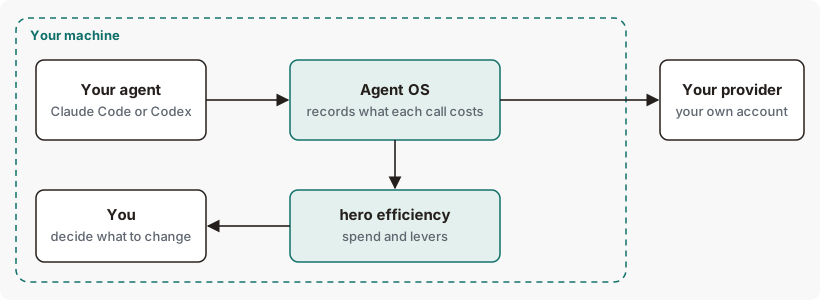
Agent OS records what each of your agents' model calls costs, on your machine: the model and the tokens, never your prompts or responses. hero efficiency prices those calls at public list prices, or your own rates, and reports spend and what each lever found. See How Efficiency works.
Get started with hero efficiency
Before you start: Agent OS is installed. With no calls recorded, you'll see the first view under Example output.
See your estimated spend.
hero efficiencyYou should see a window, a call count, and spend or "nothing measured yet". See Example output.
See all twelve levers.
hero efficiency listYou should see one row per lever. See Example 1.
See the evidence behind each number.
hero efficiency --detailsEach shared number appears as numerator/denominator, followed by the reasons any figure is partial.
Nothing here changes your work, so there's nothing to undo.
Example output of hero efficiency
Before any calls are recorded
Output from version 0.1.36rc13. Trimmed where you see …
With recorded calls
Sample output (simulated data). 30 days of Claude Code and Codex calls. Lines with dollar amounts are left out where you see …
Efficiency · rolling 30d (Oct 09–Nov 08 UTC) · 311 calls
  …
  311 metered records (incl. 0 evaluation replays)
  Ekamyth Agent OS saved       unknown not measured — the price of the model you
                                       asked for wasn't recorded (7 buckets not
                                       measured yet)

WHERE THE SAVING CAME FROM
  We bring efficiency with all these levers. We are still measuring their
  impact.
  Routing                      unknown not measured — the price of the model you
                                       asked for wasn't recorded
  Rules as code (codify)       not measured yet
  Failures and retries avoided not measured yet
  Context and memory trimming  not measured yet
  Output compression           not measured yet
  Tool and reasoning waste     not measured yet
  Right-sized agents           not measured yet
  Our part of caching          not measured yet
  …

IS IT REAL?
  Measured    model and tokens (311 of 311 calls)
  Quality not measured for these calls
  18 of 311 metered records changed model (record count, not distinct calls)
  Not netted  on 49 calls the Runtime changed request bytes, which can cost
              provider-cache discount (314k tokens, not priced yet)

TOP MOVES
  newest 50 of 311 records read · counts cover only these
  gpt-5.4 → gpt-5.4-mini · 3 moved records · cost-min
  claude-opus-4-8 → claude-sonnet-5 · 1 moved record · cost-min

NOT SAVED YET  6 levers with an opportunity · 3 not priced — no price for this
               lever's evidence · your agent could change: blind retries, long
               outputs, repeated tool calls, calls still on the expensive model
               · --details
NEXT STEP      In your agent: have your agent change the request before it
  …
The saved line and the Routing line read not measured when the price of the model your agent asked for wasn't recorded, even with many calls recorded. hero efficiency prints what it measured and leaves the rest as not measured.
In TOP MOVES, the word after each move is the reason. cost-min: the cheapest model that fits the call. right_sized: moved to a smaller model because measured evidence says it does this kind of work as well.
When a call that was moved to another model fails, the savings figure can overstate.
More hero efficiency examples
Example 1. To see the savings levers
hero efficiency listExample output. The format is the command's; the numbers are examples. Excerpt: the lever table only, before any calls are recorded.
EFFICIENCY LEVERS
  ┌─────────────────────┬─────────────────┬────────────────────┬─────────────┐
  │ Lever               │ Already saved   │ Opportunity        │ Status      │
  ├─────────────────────┼─────────────────┼────────────────────┼─────────────┤
  │ Codify              │ Unavailable     │ Unavailable        │ UNAVAILABLE │
  │ Route               │ not measured —  │ Unavailable        │ UNAVAILABLE │
  │                     │ the price of    │                    │             │
  │                     │ the model you   │                    │             │
  │                     │ asked for       │                    │             │
  │                     │ wasn't recorded │                    │             │
  │ Memory              │ Unavailable     │ Unavailable        │ UNAVAILABLE │
  │ Caching             │ Unavailable     │ Unavailable        │ UNAVAILABLE │
  │ Retries             │ Unavailable     │ Unavailable        │ UNAVAILABLE │
  │ Output size         │ Unavailable     │ Unavailable        │ UNAVAILABLE │
  │ Tool duplication    │ Unavailable     │ Unavailable        │ UNAVAILABLE │
  │ Over-thinking       │ Unavailable     │ Unavailable        │ UNAVAILABLE │
  │ Eval coverage       │ Unavailable     │ Unavailable        │ UNAVAILABLE │
  │ Prefix alignment    │ Unavailable     │ Unavailable        │ UNAVAILABLE │
  │ Content compression │ Unavailable     │ Unavailable        │ UNAVAILABLE │
  │ Agent right-sizing  │ Unavailable     │ Unavailable        │ UNAVAILABLE │
└─────────────────────┴─────────────────┴────────────────────┴─────────────┘| Column | What it means |
|---|---|
| Already saved | Realized savings against a named baseline. A move to a more expensive model is never counted. |
| Opportunity | Savings found but not yet realized, priced on that lever's own basis. Never added across levers. |
| Status | ACTION: a positive, evidence-qualified opportunity. CLEAR: no current evidence of waste, which isn't proof there's none. UNAVAILABLE: not enough evidence. |
To see what each lever looks for, see What Efficiency looks for.
Example 2. To see what's recorded for a time range
hero efficiency --since 2026-11-01T00:00:00ZThis prints the THIS JOB view, not the default view. It has no "You spent" line. It shows the first and last call and the record-level lines.
Example 3. To use your own rates
Create a rates file:
{"claude-haiku-4-5": {"in_per_mtok": 0.80, "out_per_mtok": 4.00}}Check it, then set it:
hero efficiency billing ~/rates.json
export HERO_BILLING_RATES="$HOME/rates.json"
hero efficiency list
billing will:
- Check the file and print what it would price. It saves nothing.
The export will:
- Make that rate card apply in that shell, for any command you run from it.
Example output. The format is the command's; the numbers are examples. Excerpt: the closing lines from billing.
Checked, not saved — hero reads your rates from HERO_BILLING_RATES. To use them:
  export HERO_BILLING_RATES=<abs path>
  (models the card does not list stay `cost ?`; a partial card is never shown as reconciled)
To verify, read the first line of hero efficiency list: it says reconciled · rates from <path> when your card prices every call. If the card misses a model, it says partial, not reconciled. To go back to list prices, unset the variable.
Each model takes in_per_mtok and out_per_mtok, and optionally cache_read_per_mtok, cache_creation_per_mtok and cache_creation_1h_per_mtok.
Example 4. To use the numbers in a script
hero efficiency --jsonExit codes and errors for hero efficiency
| Code | Meaning | What to do |
|---|---|---|
0 | The output asserts a positive result, or is advice with no verdict. | Nothing. |
1 | A truthful negative result. For billing: no path and no HERO_BILLING_RATES, or the file wasn't found. | Read the output. For billing, give it a file that exists. |
2 | Refused: unknown flag or subcommand, missing argument, unusable rates file, or not available. | Check the synopsis and the errors below. |
3 | A source it needs is unavailable at runtime. | Email support at the address in your welcome email, with the output you saw. |
| Error | Cause | Fix |
|---|---|---|
invalid_since | --since isn't an ISO-8601 UTC time, for example --since yesterday. | Use a form like 2026-11-01T00:00:00Z. |
invalid_window | --since is more than 30 days ago, or isn't in the past. | Use a past time within the last 30 days. |
billing rates file not found: <path> | The rates file isn't at that path. | Check the path. |
HERO_BILLING_RATES=<path> is not valid JSON — fix the file or unset HERO_BILLING_RATES | The variable points at a file that isn't valid JSON. | Fix the file, or unset the variable. |
efficiency selectors apply only to status and list | --since was used with another subcommand. | Use it with status or list. |
Files and environment for hero efficiency
| Name | Kind | Purpose |
|---|---|---|
| Your rates file | JSON file you create | Your own prices per model. See Example 3 for the format. |
HERO_BILLING_RATES | Environment variable | Path to your rates file. It becomes the rate card. A path that doesn't exist falls back to list prices. |
Limits of hero efficiency
| Limit | Behaviour | Can you change it? | What to do |
|---|---|---|---|
| Price basis | Public list prices, not your bill. Each model's price carries the date it was read; the card itself is dated 2026-09-09. A partial card is never shown as reconciled. | Yes | Set your own rates. |
| Models with no list price | Counted, not priced or guessed. A spend amount then shows +. | Yes | Set your own rates. |
| Routing savings | The saved line and the Routing line can read not measured, or be wrong. | No | Read the spend and call counts; treat the routing saving as provisional. |
| Window | Every view covers 30 days at most. --since can't go further back. | No | Use --since to choose a shorter window. |
--session | Prints the THIS JOB view with no data for that session, because calls aren't linked to sessions. | No | No action is required from you for this missing measurement; this view cannot yet link these measurements to a session. |
| Levers with no findings | Some levers read Unavailable for lack of evidence. | Only when more evidence is recorded. | On a fresh install with nothing recorded, only Eval coverage shows a finding. In a run with sample data, Retries, Output size, Tool duplication, Route and Prefix alignment showed findings too. |
Commands related to hero efficiency
Checked against Agent OS 0.1.36rc14 (build 599c5e120c18) on 17 Nov 2026.