hero privacy
Shows what this install may send off your machine, and what it recorded as sent.
What hero privacy does
It answers one question: what can Ekamyth Agent OS send from my machine, and what did it send? The default view lists every declared flow, where it goes, what it carries and whether it's on, then the sends its egress guard recorded. Four flows send without the guard and are never in that record; see Limits. hero privacy egress lists each recorded send. hero privacy compliance shows how your latest agent session did against your rules.
- Use it when you or your security team want to know what leaves the machine.
- Use something else when you want to see your agents' model calls to your own provider, which aren't on this list (
hero efficiency), or tool-call decisions (hero govern). - Alias:
hero audit, with the same output, refusals and exit codes. - Reads or changes: reads only. A run may send the usage heartbeat (see Files).
For the topic, see How Privacy works.
Synopsis for hero privacy
hero privacy [status] [--json]
hero privacy --details
hero privacy egress
hero privacy compliance
hero privacy help | --help | -h
hero help privacy
hero audit ...
Run with no subcommand, it behaves as status.
Subcommands of hero privacy
| Subcommand | What it does | Reads or changes |
|---|---|---|
status | What may leave, and what actually left. This is the default. | Reads |
egress | One line per recorded send: where it went, its size, its data class and whether it was delivered. --details is the same. | Reads |
compliance | Rule checks for your latest agent session: rules checked, passed, violated and sampled, and coverage. A record is written when an agent turn ends. | Reads |
help | This command's help. Same as --help, -h and hero help privacy. | Reads |
The help doesn't list a demo subcommand, but the usage line printed with an error and the refusal for an unknown subcommand name one. It needs an examples package that isn't installed, so it isn't documented here.
Arguments for hero privacy
| Argument | Type | Required | Default | What it does |
|---|---|---|---|---|
--json | Flag | No | Off | With status: the same screen as JSON. egress, --details and compliance ignore it and print text. |
--details | Flag | No | Off | Switches to the egress view. |
How hero privacy gets its answer
It reads the declared list this install ships with, and the record of sends that went through the checked path. Each send through that path is checked against the list and recorded. Some flows send without going through it, and the view names them. Your agents' model calls to your own provider aren't on the list. Agent OS doesn't block other network traffic on your machine. For the picture, see How Privacy works.
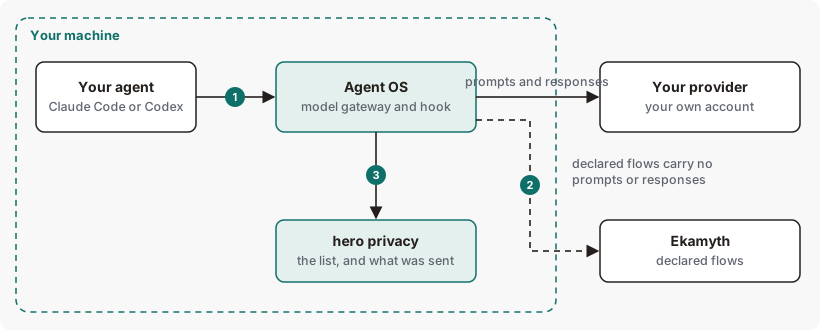
hero privacy shows.Get started with hero privacy
Before you start: Agent OS is installed.
See what may leave, and what left.
hero privacyYou should see the declared list, then what its egress guard recorded as sent. See Example output.
See each recorded send.
hero privacy egressYou should see one line per send, or
no egress log yet. See Example 1.See how your latest session did against your rules.
hero privacy complianceYou should see the session's rule checks, or
No session compliance records.See Example 2.
Nothing here changes your work, so there's nothing to undo.
Example output of hero privacy
In the run that printed this, the usage-beacon flow read off.
Output from version 0.1.36rc13. Trimmed where you see …
How to read hero privacy output
| Line | What it means | What to do |
|---|---|---|
| 1. Title | The view: what may leave, and what was recorded. | Read both parts. |
| 2. What may leave | The declared list. Sends through the checked path, which the output calls the egress guard, are checked against it. Model calls to your own provider aren't on it, and other network traffic isn't blocked. | Read it as the list of what Agent OS itself may send. |
| 3. Flow table | Each flow: its name, where it goes, what it carries, and when it's on. off means it isn't sending. on means it hasn't been turned off. Other values say what turns it on, such as typing an email at hero setup. | To turn off a flow that's on, use the setting in its when column. |
| 4. Not recorded | Flows marked NOT RECORDED send without the checked path, so their sends never appear under what actually left. | Treat what actually left as partial for those flows. |
| 5. What actually left | Recorded sends, grouped by flow, with counts, size and whether they were delivered. A send that was blocked is shown as never having left. A send to a destination not on the list is marked ✗ UNDECLARED. | For any UNDECLARED send, run hero privacy egress. |
| 6. Not a full record | The flows whose sends aren't recorded. | See Limits. |
More hero privacy examples
Example 1. To see each recorded send
hero privacy egressEach line is one send: its flow, full address, size and data class. · sent means confirmed sent, · NOT SENT means it failed or was refused, and no ending means delivery wasn't confirmed. ✗ BLOCKED means it was stopped and never left. The last line is the verdict. With nothing recorded yet, it prints no egress log yet.
Example 2. To see your latest session against your rules
hero privacy complianceCoverage is the share of rules actually checked out of all checked, not-covered and unevaluated rules, so two checked rules, one not-covered rule and one unevaluated rule give 50% coverage, as in the example below.
Example output. The format is the command's; the numbers are examples. Excerpt: one line on behavioural rules is left out.
SESSION COMPLIANCE — example-session
  agent:            Claude
  rules checked:    2
  passed:           1
  violated:         1
  sampled:          1
  not yet covered:  1
  coverage:         50%
  compliance:       50%  (of rules checked)

  not checked (no verdict — never counted as passed):
    → tone-check — not sampled this turn

  violations:
    → cite-sources (1 violation(s) · auto-remediated)
auto-remediated means that rule's record reports at least one repair. It doesn't mean every violation was repaired, and the label doesn't appear after every repair. A rule with no verdict is never counted as passed. With no records yet, it prints No session compliance records. and says to check the hooks with hero setup --check, then finish an agent turn.
Example 3. To use the view in a script
hero privacy --jsonIt prints {"data": {...}}. data.contract has one object per flow, with flow, to, carries, when, on (true, false or null) and recorded. data.left has the recorded sends. not_recorded names the flows that send without being recorded. recorded_clean is true when no recorded send went to an undeclared destination. clean stays null while any flow sends without being recorded.
Exit codes and errors for hero privacy
| Code | Meaning | What to do |
|---|---|---|
0 | The view printed, and no undeclared send was recorded. Includes blocked sends, compliance and help. | Nothing. |
1 | An undeclared send was recorded, or a usage error. | Run hero privacy egress and investigate. |
2 | Refused, or on egress, the declared list couldn't be read. | See the errors below. |
3 | The record of sends couldn't be read or checked. | See the errors below. |
| Error | Cause | Fix |
|---|---|---|
privacy has no verb '<word>' | An unknown subcommand. Exit 2. | Check the synopsis. |
privacy has no flag '<flag>' | An unknown flag with compliance or help. Exit 2. | Check the synopsis. |
hero privacy: unknown option '<flag>', then a usage line | An unknown flag with the default view or egress. Exit 1, as text even with --json. | Check the synopsis. |
the egress ledger at <path> could not be read (<reason>) — hero cannot say whether undeclared data left this machine, so it will not print a verdict | The record of sends is damaged. Exit 3. | Email support at the address in your welcome email, with the output you saw. |
the egress ledger at <path> could not be checked (<reason>) | The record of sends can't be opened, for example a permission error. Exit 3. | Check the file's permissions. |
Files and environment for hero privacy
| Name | Kind | Purpose |
|---|---|---|
HERO_BEACON=off | Environment variable | A read of hero privacy can send the usage heartbeat. Usage reporting is on by default. It sends metadata only — never content, prompts or responses — at most once a day. Turn it off with HERO_BEACON=off. |
HERO_LEARNED_ROUTING=off | Environment variable | Named in the list as the way to turn off the plan check and learned routing download. |
HERO_HOME | Environment variable | Root of Agent OS's files. Default ~/.hero. |
Limits of hero privacy
| Limit | Behaviour | Can you change it? | What to do |
|---|---|---|---|
| Record of what left | Partial. Four flows are marked NOT RECORDED: rule-compile, decision-metadata, usage-metrics and policy-pull. They send without the egress guard checking their destination, so their sends never appear under what actually left, and clean in the JSON is null. Most are off unless configured. | No | Read their rows in the declared list for what they carry and what turns them on. |
hero compile status | Contacts the Ekamyth server outside the declared list. | No | Treat the declared list as incomplete for this command. |
hero enforce on Codex | Makes the Codex app contact github.com. | No | Treat the declared list as incomplete for this command. |
| A local Monitor data endpoint | One Monitor data endpoint on this machine can return facts this screen would normally hide. No screen in the Portal requests them, and nothing leaves your machine. | No | None. |
| Rule compile | Automatic sending is paused by default. Manual hero compile can still send when an Ekamyth key is configured. | No | Read its row in the declared list. |
| Time of a send | Recorded sends carry no time, so there's no time window. | No | No per-send time is available because the egress ledger does not record timestamps. |
| Other network traffic | Not blocked or listed, including a call made by a script your agent runs. | No | Use your own network controls for that. |
--json on egress, --details and compliance | Ignored: they print text, though the help says --details gives rows with --json. | No | Use hero privacy --json. |
compliance | Covers Claude Code and Codex sessions; Codex's end-of-turn hook needs Codex 0.114.0 or later. Reading the report needs no provider key. A rule that is checked by a model needs the API key of the provider doing the check; a local provider needs none. A rule that was not checked says why, and is never counted as passed. A damaged record reads as No session compliance records. | No | Check the hooks with hero setup --check, then finish an agent turn. If a rule says it was not checked, address the reason it gives, then finish another turn. |
on in the list | Means not turned off. A plan check row reads on even before you redeem a code. | No | Read the when column with it. |
| Blocked sends | The view shows ✗, and the exit code is still 0. | No | Read the view, not only the exit code. |
Commands related to hero privacy
Checked against Agent OS 0.1.36rc14 (build 599c5e120c18) on 17 Nov 2026.