hero brain
Shows, checks and adds to your Brain, and holds the commands for saved threads.
What hero brain does
It answers: what does my agent know about me and my work, and is it right? It shows each section of your Brain, exactly what your agent draws from, and any problems with the files. It keeps a fact you give it, with an undo id. Its threads verbs are for saving a checkpoint of work and loading it again; they have their own page.
- Use it when you want to see or check what your agent gets at session start, or add or take back a fact.
- Use something else when you want to see which of your rules Ekamyth Agent OS gave your agent (
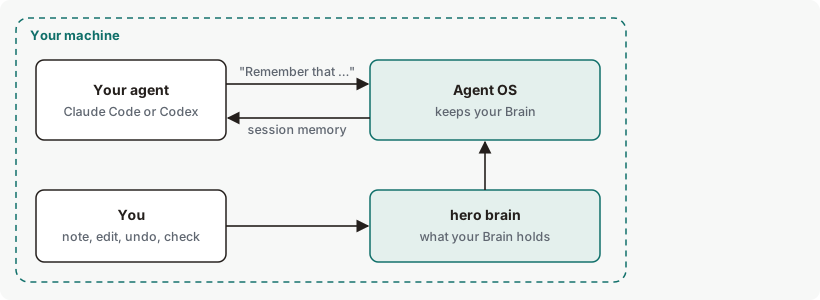
hero memory), or enroll the agent identity thread commands need (hero identity). - In your agent: start a prompt with "Remember that …" to keep a fact without the terminal. See Limits.
- Reads or changes:
status,effectiveanddoctoronly read.note,undoandinitchange files. See Files and environment.
The Brain holds facts, not rules. Memory is one section of it. hero setup also installs hero brain session-start as your agents' session-start hook; you don't run it yourself.
Synopsis for hero brain
hero brain status [--json]
hero brain effective [--surface claude|codex] [--json]
hero brain doctor
hero brain note --scope user --section memory --text <fact>
hero brain undo <id>
hero brain init
hero brain threads create|list|save|history|resume ...
hero brain import [--from <path>[,<path>...]]
hero brain help
Run with no subcommand, it prints its help. For threads, see hero brain threads. import is Advanced.
Subcommands of hero brain
| Subcommand | What it does | Reads or changes |
|---|---|---|
status | Each section of your Brain, its file and whether the file exists, and when session memory was last given to an agent. | Reads |
effective | The Brain one agent draws from: which sections load, which are left out and why. | Reads |
doctor | Looks for missing, unreadable and conflicting Brain files and misplaced Agent OS blocks, and gives the next step. | Reads |
note | Keeps one fact in your memory file and prints its undo id. Refuses secrets, rules, junk and text over the limit. | Changes |
undo | Takes back one kept line, if the file still holds exactly what that keep wrote. | Changes |
init | Writes the Brain's manifest, which lists its sections. It creates no section file. | Changes |
threads | Commands for saved threads. See Threads. | See hero brain threads |
help | This command's help. Same as --help and hero help brain. | Reads |
hero brain --help also lists verbs this page doesn't cover, and doesn't list note, undo or threads. See Limits.
Arguments for hero brain
Arguments for status
| Argument | Type | Required | Default | What it does |
|---|---|---|---|---|
--json | Flag | No | Off | Machine-readable output: root, schema, version, sections and session_memory. |
Arguments for effective
| Argument | Type | Required | Default | What it does |
|---|---|---|---|---|
--surface claude|codex | Agent name | No | claude | The agent whose Brain to show. The help shows it as required; it isn't. |
--json | Flag | No | Off | Machine-readable output, including the full merged text of the Brain. |
Arguments for doctor
None. doctor takes no options, and --json is refused.
Arguments for note
| Argument | Type | Required | Default | What it does |
|---|---|---|---|---|
--scope user | Text | Yes | None | Whose Brain. user is the only scope on the customer build. |
--section memory | Text | Yes | None | Which section. memory is the only section a note can go to. |
--text <fact> | Text | Yes | None | The fact to keep. At most 600 characters and 3 lines. |
Arguments for undo
| Argument | Type | Required | Default | What it does |
|---|---|---|---|---|
<id> | 32 hex characters | Yes | None | The undo id from the line Agent OS printed when it kept the fact. |
Arguments for init
None.
How hero brain reads and keeps your Brain
Your Brain is a set of plain files on your machine. hero brain reads them to show what's there and what your agent draws from, and writes only when you keep or take back a fact or set up the manifest. At each session start, Agent OS gives your agent the part that fits the current project. See How the Brain works.
Get started with hero brain
Before you start: Agent OS is installed, and hero setup has connected Claude Code or Codex.
See what to set up first.
hero brain doctorOn a new install you should see
not initialized yetand a next step naming your identity and memory files. See Example 1.Keep your first fact.
This command will:
- Add one line to your memory file, creating the file if it's missing.
- Print the line's undo id.
hero brain note --scope user --section memory --text "The example-project codename is Bluefin."You should see
"status": "kept"and a message ending(undo: hero brain undo <id>).See your Brain's sections.
hero brain statusThe
memoryrow should readok. See Example output.See what your agent draws from.
hero brain effectivesections:should listmemory.
To undo step 2, run hero brain undo <id> with the id it printed.
Example output of hero brain
Status, with identity and memory files
hero brain statusExample output. The format is the command's; the numbers are examples.
Before hero brain init, the same rows are listed in the order identity, memory, projects, areas, resources, archive, rules, policies, skills, sources. A new install reads session memory: never injected.
On a new install:
Output from version 0.1.36rc13. Trimmed where you see …
schema:  hero.brain.manifest.v1
version: 0.1.0
root:    …/.hero/brain
session memory: never injected
sections:
  identity   markdown missing  …/.hero/SOUL.md (pinned)
  memory     markdown missing  …/.hero/MEMORY.md (pinned)
  projects   markdown missing  …/.hero/brain/1-PROJECTS.md
  areas      markdown missing  …/.hero/brain/2-AREAS.md
  resources  markdown missing  …/.hero/brain/3-RESOURCES.md
  archive    markdown missing  …/.hero/brain/4-ARCHIVE.md
  rules      markdown missing  …/.hero/brain/rules.md
  policies   json     missing  …/.hero/brain/policies.json
  skills     json     missing  …/.hero/brain/skills.json
  sources    json     missing  …/.hero/brain/sources.json
How to read hero brain output
| Line | What it means | What to do |
|---|---|---|
| 1, 2. Schema and version | The format of your Brain's manifest. | Nothing. |
| 3. Root | The folder that holds your Brain's files, apart from identity and memory. | Nothing. |
| 4. Session memory | never injected, or when session memory was last given, to which agent (claude or codex) and in what state. ok means it loaded and empty means there was nothing to give; any other state is the reason it failed. status unavailable means Agent OS couldn't read its own note. | Nothing if no session has started since setup. A failure reason is also written to ~/.hero/brain-session-start-errors.log. |
| 5 to 8. Sections | One row per section: name, kind (markdown or json), state and file. ok means the file is there and readable, missing means there's no file, and unreadable means it's there but can't be read, with a fix: line after it. (pinned) marks identity and memory. | Create a missing pinned file. For an unreadable file, follow its fix: line. A missing section that isn't pinned is fine. |
| 7. Identity, memory | Your identity file and your memory file. | Edit them directly, or add facts with note. |
| Rules, policies, skills, sources | Other sections the manifest lists. | Nothing. A missing section that isn't pinned is fine. |
warning: section … is …; not loaded | A section entry in the manifest is invalid, and isn't loaded. status then exits 1. | Check that section's entry in the manifest. |
More hero brain examples
Example 1. To check your Brain for problems
hero brain doctorOn a new install:
Example output. The format is the command's; the numbers are examples.
effective_hash: sha256:71caaeb35f8238b3046c17c411fccef881e06e2cb5e99aa5e095635c286f24f5
scopes_seen:    user
not initialized yet — no manifest at /Users/example/.hero/brain/manifest.json
  - pinned section 'identity' missing at /Users/example/.hero/SOUL.md
  - pinned section 'memory' missing at /Users/example/.hero/MEMORY.md
next step: create /Users/example/.hero/SOUL.md and /Users/example/.hero/MEMORY.md, then run `hero brain doctor` again
With identity and memory, and one junk line in memory:
Example output. The format is the command's; the numbers are examples.
effective_hash: sha256:30353014dfd4cc858916ac2ef0c4c07dce8a756364c1df8a4782a88c77f1c723
scopes_seen:    user
OK — no issues
/Users/example/.hero/MEMORY.md:4 assistant_filler - Let me check the logs.
Brain: review cleanup with hero brain clean --junk (dry-run; add --yes to remove).
Before init, missing pinned files are a next step and doctor exits 0. After init, they're listed under issues: and it exits 1. effective_hash changes whenever the content your agent draws from changes. A junk line reads <file>:<line> <reason> <text>.
Example 2. To see what your agent draws from
hero brain effective --surface codexExample output. The format is the command's; the numbers are examples.
effective_hash: sha256:63172836f2d64e2ec9f3ca44e89033a989c05151626ef0a889a92c910e2f8470
scopes_seen:    user
sections:       identity, memory, projects
omitted:
  - areas: not_present
  - resources: not_present
  - archive: not_present
  - rules: not_present
  - policies: not_present
  - skills: not_present
  - sources: not_present
sections: lists what loads, and omitted: what doesn't, with the reason. not_present means the section has no content. A conflicts: list follows when two sources disagree. This is the Brain your agent draws from; at session start, Agent OS then picks the lines that fit the current project.
Example 3. To keep a fact and take it back
hero brain note --scope user --section memory --text "The example-project codename is Bluefin."Example output. The format is the command's; the numbers are examples.
{"scope": "user", "section": "memory", "status": "kept", "message": "Brain: kept in /Users/example/.hero/MEMORY.md — The example-project codename is Bluefin. (undo: hero brain undo 0123456789abcdef0123456789abcdef)"}hero brain undo 0123456789abcdef0123456789abcdefExample output. The format is the command's; the numbers are examples.
Brain: undid 0123456789abcdef0123456789abcdef — restored /Users/example/.hero/MEMORY.mdstatus reads kept, updated when the fact replaces an older line on the same subject, or duplicate when the line is already there; all three exit 0. A fact that isn't kept prints error and message, and exits 2; see Exit codes and errors.
Example 4. To use the Brain in a script
hero brain effective --jsonThe output has hash, sections_loaded, omitted, conflicts, scopes_seen and text, the merged Brain. status --json also works.
Threads
hero brain threads holds the commands for saving a named checkpoint of work in a workspace and loading it again: create, list, save, history and resume. Every verb refuses until an agent identity is enrolled. See hero brain threads.
Advanced: record files you already use
hero brain import [--from <path>[,<path>...]]import records the path, size and fingerprint of instruction files you already use, so your Brain knows where they are. It copies no content, so what Claude Code or Codex keep in their own memory stays with that tool. With no --from, it records ~/CLAUDE.md, ~/AGENTS.md and your identity and memory files. A path that doesn't exist is recorded as missing. Each run replaces the last record.
Example output. The format is the command's; the numbers are examples.
recorded 4 import provenance entries at /Users/example/.hero/brain/sources.jsonLimit: it records each file's path and fingerprint only.
Exit codes and errors for hero brain
| Code | Meaning | What to do |
|---|---|---|
0 | Success, or advice. Includes doctor before init, and a note that was a duplicate. | Nothing. |
1 | A truthful negative: doctor found issues, undo was refused, or status found an invalid section. | Read the output. |
2 | Refused: unknown verb or flag, a missing argument, or a note that wasn't kept. | Check the synopsis and the errors below. |
3 | Unavailable: a file import couldn't read. For threads, see its exit codes. | See the errors below. |
| Error | Cause | Fix |
|---|---|---|
brain has no verb '<verb>' | The subcommand doesn't exist. | Check the synopsis. |
hero brain <verb>: error: unrecognized arguments: <args> | An option the subcommand doesn't take, such as doctor --json. | Check its arguments. |
Brain: not kept (this reads as a rule, not a fact; add it to your rules instead) | The note reads as a rule. | Add it to your rules file and register it with hero init. |
Brain: not kept (<reason>) | The note is junk, or over 600 characters or 3 lines. | Shorten it, or leave it out. |
Brain: not saved: looks like a secret | The note looks like a secret. | Keep secrets out of your Brain. |
a user note goes to --section memory | A section other than memory. | Use --section memory. |
member, role and team notes are not available in this build; use --scope user | A scope other than user. | Use --scope user. |
Brain: undo refused (<reason>) | unknown_id: no keep has that id. already_undone. file_changed: the file changed since that keep. backup_unavailable. | Check the id. |
Files and environment for hero brain
| Name | Kind | Purpose |
|---|---|---|
~/.hero/SOUL.md | File you create and edit | Your identity section. Pinned. |
~/.hero/MEMORY.md | File you edit; note and "Remember that …" add to it | Your memory section. Pinned. |
~/.hero/brain/1-PROJECTS.md, 2-AREAS.md, 3-RESOURCES.md, 4-ARCHIVE.md | Files you create and edit | Your projects, areas, resources and archive sections. |
~/.hero/brain/projects/ | Folder you can read | Facts about one project, kept when you say "this project" in a "Remember that …" prompt. |
~/.hero/brain-session-start-errors.log | File you can read | One line for each time session memory failed to load: the time, the agent and the reason. No content. |
HERO_HOME | Environment variable | Root of those files. Default ~/.hero. |
HERO_BRAIN_SESSION_MEMORY=off | Environment variable | Turns off session memory, and the rules block, at session start. |
HERO_BRAIN_CAPTURE_OFF=1 | Environment variable | Stops "Remember that …" prompts from being kept. |
Limits of hero brain
| Limit | Behaviour | Can you change it? | What to do |
|---|---|---|---|
| What the Brain holds | Only the facts you state, the files you edit and the threads you save. It doesn't pick up facts from your agent's work on its own. | No | Say "Remember that …" or use note. |
| "Remember that …" | Only a prompt that opens with "Remember that …", "Remember: …", "Remember this instead: …", "Remember my …" or "Remember our …" is kept, optionally after a word such as "please". "Remember to …", "Don't forget …" and a "remember" in the middle of a message aren't. | No | Start the prompt with "Remember that". |
| Fact size | A fact is at most 600 characters and 3 lines. | No | Split it into shorter facts. |
| Session memory budget | About 1,000 tokens on Claude Code and 750 on Codex. The block says what didn't fit. | No | Keep the facts every session needs short and near the top of the file. Memory fills in a fixed order (identity, this project's file, memory, then projects, areas, resources and archive), and the block names what didn't fit. Nothing is removed from your file. |
| Choosing by project | Session memory is chosen once per session, by the project it opened in, not by task or prompt. | No | For a fact that belongs to one project, say "this project" in your "Remember that …" prompt. |
| Threads | See Limits of hero brain threads. | No | Read that page's limits. |
| The Brain page in the Portal | Opening it can save its example notes as your own, so your agent reads them. | No | Edit or delete them in your Brain files. |
init | Writes only the manifest, not the identity and memory files doctor then asks for. After init, hero brain threads resume refuses with required_brain_section_unreadable until both files exist. | No | Create those two files yourself, or add a fact with note. |
uninstall | Removes the lines Agent OS added to your agent's own files, and keeps your own lines. It is a dry run unless you add --apply. | No | Run hero brain uninstall to see what it would remove, then hero brain uninstall --apply. |
--json | doctor and hero brain itself refuse --json. | No | Use status --json or effective --json. |
| Help | hero brain --help doesn't list note, undo or threads, and lists verbs this page doesn't cover. | No | Use this page. |
Commands related to hero brain
Checked against Agent OS 0.1.36rc14 (build 599c5e120c18) on 17 Nov 2026.