How Efficiency works
Ekamyth Agent OS shows what your agents' work costs and looks for waste across the work: rules, repeated calls, retries, output, reasoning effort, caching and model choice.
How does Efficiency work?
Efficiency is the part of Agent OS that answers "why is my agent expensive, and what do I fix?"
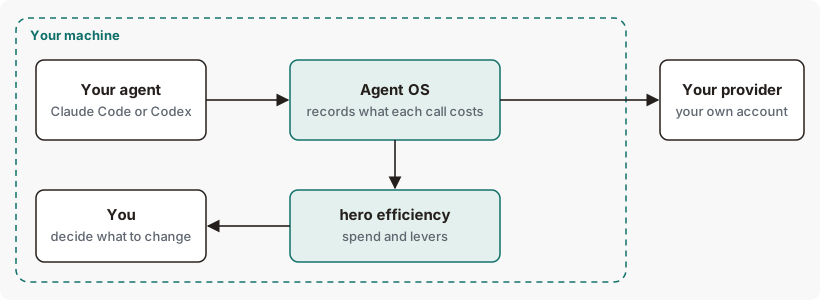
Your agents keep running in Claude Code or Codex. Their model calls pass through Agent OS on your machine on the way to your provider, and Agent OS records what each call costs: the model and the tokens, never your prompts or responses. When you run hero efficiency, it shows what the work cost, what Agent OS has already saved, and the levers that would lower it. The levers only report. You choose what to change.
Efficiency concepts
| Term | What it means |
|---|---|
| Model gateway | The part of Agent OS your agents' model calls pass through on the way to your provider. |
| Rate card | The prices used to estimate cost: public list prices installed with Agent OS, or your own rates. |
| Lever | A check Efficiency makes. Most look for a kind of waste. Each is shown with what it has saved and could save, where that's measured. |
| Unavailable | There isn't enough evidence to give a figure. It never means $0. |
| Unpriced | A model with no list price. It's counted, never guessed. |
What Efficiency looks for
Efficiency covers the whole life of the work, not only which model answers a call. It checks your recorded work against its levers and ranks what it finds by estimated savings. These checks report; they don't change your work. The names below are the ones hero efficiency list prints.
| Lever | What it looks for |
|---|---|
| Retries | Calls re-sent after a failure. |
| Codify | Mechanical rules still running on a model, which could run as code with no model call. |
| Caching | Identical requests sent to a model again, where a response cache would skip the call. |
| Prefix alignment | Calls where Agent OS itself changed the part of a request your provider's prompt cache depends on. It counts per call, and a call it couldn't measure counts as unknown, never as changed. A finding needs at least 5 measured calls and either 2 or more changed calls or at least 20% of them. It reports the input tokens of those calls, with no dollar amount. |
| Output size | Calls that generate far more output than that kind of task typically does. It counts real output, not unused limits. |
| Over-thinking | Calls using more reasoning effort than the same kind of task needs. For each kind of task, the lower effort is the lowest level (none, low, medium, high) at which that kind of task has an accepted call in the window. Calls above that level are counted. A record with no accepted flag counts as accepted. |
| Route | Work still on a more expensive model than it needs. |
| Eval coverage | Whether evaluation results exist, so a cheaper model can be held to a quality bar. |
| Memory, Content compression, Tool duplication, Agent right-sizing | Memory: rules loaded on every call that are mechanical enough to run as code. Content compression: repeated context that isn't a rule. Tool duplication: the same tool called twice or more with the same input within one job. Agent right-sizing: a top-tier session that spent at least half of its classified output on mechanical turns (reads, searches, status checks) that a cheaper model from a provider the session already used could do. hero efficiency list prints these too. |
Route, Codify, Memory, Eval coverage and Prefix alignment never put a price on what they find, so they read Unavailable whatever is recorded, and no setting of yours changes that. Memory and Content compression also get no input on this build, so they never show findings. Caching, Retries, Output size, Over-thinking, Tool duplication, Agent right-sizing and the rest read Action once they find a priced saving, and Unavailable otherwise; only recorded evidence changes them. Tool duplication needs tool-call records that carry an input fingerprint. Agent right-sizing needs imported session history, which is read only when history import is enabled or you have consented.
On a fresh install with nothing recorded, neither Tool duplication nor Agent right-sizing shows a finding. In that state hero efficiency --json lists one lever with a finding, the missing evaluation results behind Eval coverage.
What to do about a finding
Each finding names its next step. For Route, Codify, Memory and Eval coverage it is hero help route, hero help codify or hero help eval, and where that help page isn't available in your build the finding says so. For the others the step is a change in your agent: change the request before it retries (Retries), add an exact-match response cache (Caching), cap the output length it asks for (Output size), lower the reasoning effort it asks for (Over-thinking), reuse a repeated tool call's result (Tool duplication), hand reads and searches to a cheaper subagent (Agent right-sizing), or use the memory skill (Content compression). For Prefix alignment there is nothing to change in your agent.
What leaves your machine
What Efficiency records is kept on your machine and holds no prompt or response text. Agent OS doesn't send those call records or usage totals to Ekamyth unless you opt in by setting HERO_LEARN_URL.
When you run hero efficiency, list or billing, Agent OS can send a usage beacon: a random install id, version, OS family and event. Usage reporting is on by default. It sends metadata only — never content, prompts or responses — at most once a day. Turn it off with HERO_BEACON=off.
When something goes wrong
| What happens | What you see | What happens to the work |
|---|---|---|
| Your provider refuses a call | The call is counted, with zero recorded usage and zero recorded cost. | Your agent gets the provider's response. |
| A model has no list price | It's counted and left unpriced. A spend amount shows +. | Nothing changes. |
| Your rates file isn't valid JSON | The command refuses, with exit code 2, and says to fix the file or unset the variable. | Nothing changes. |
Efficiency on Claude Code and Codex
| Claude Code | Codex | |
|---|---|---|
| List prices on the rate card | Yes | Yes |
What you can change in Efficiency
| Setting | Default | Effect |
|---|---|---|
HERO_BILLING_RATES=<path> | Public list prices | Uses your own rates. Check the file first with hero efficiency billing <path>. See the example. |
HERO_BEACON=off | On | Turns off the usage beacon. |
HERO_ROUTE=0 | Routing on | Keeps every call on the model your agent asked for. |
See Efficiency for yourself
After a few sessions with your agents, run:
# What the work cost, and what Agent OS saved
hero efficiency

# Every lever, with what it found
hero efficiency list
For the output, see Example output. All savings and cost figures in Agent OS are at public list prices, unless you set your own rates.
When a call that was moved to another model fails, the savings figure can overstate. See Routing limits.
Efficiency limits and next steps
See Limits of hero efficiency.
Checked against Agent OS 0.1.36rc14 (build 599c5e120c18) on 17 Nov 2026.