How Governance works
Ekamyth Agent OS checks the tool calls that reach its hooks in Claude Code and Codex before they run. It checks your rules as code, refuses catastrophic actions, holds what needs your yes, and records the rest.
How does Governance work?
Governance is the part of Agent OS that answers "what is my agent allowed to do, and did it follow my rules?" It works on your machine, at the point where Claude Code or Codex is about to run a tool and hands the call to its hook. What doesn't reach a hook, such as what runs inside a script, isn't checked; see What the hook sees.
You write rules in your rules file, such as CLAUDE.md or AGENTS.md. Agent OS reads them and sorts each one: a rule it can check as code, or a rule that needs judgment. Before each tool call runs, the agent's hook hands the call to Agent OS. A call that breaks one of your mechanical rules is checked as code and recorded. Once enforcement is on, the call is refused on Claude Code, and for shell commands on Codex. A send through a connected tool, such as an email or a Slack post, is held until you approve it in hero inbox. Everything else runs, and every call that reaches the hook is recorded.
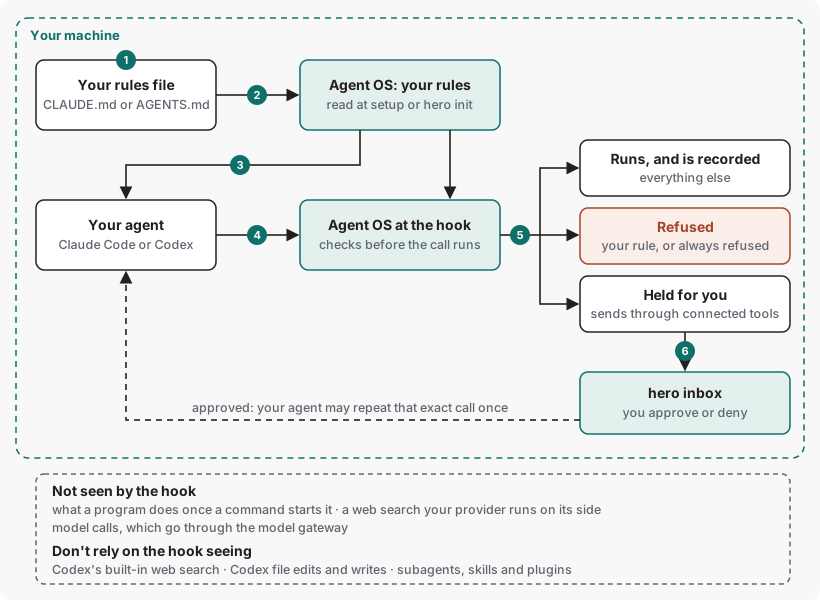
Governance concepts
| Term | What it means |
|---|---|
| Rules file | A markdown file you keep your agent's rules in, such as CLAUDE.md or AGENTS.md. A rule is one line: a list item, or a sentence that starts with a directive word such as Never, Always or Do not. See the rule format. |
| Mechanical rule | A rule Agent OS can check as code, such as "Never push to main." It's checked as code at the tool call. It blocks once enforcement is on. See Rules checked as code. |
| Judgment rule | A rule that needs judgment, such as "Keep replies short." It isn't checked as code. Agent OS's memory puts the judgment rules that apply to the work in your agent's context, as guidance. |
| Policy file | ~/.hero/govern.json: the tools your policy declares, with their stakes and scope. hero govern list shows it. You can edit it; your agent can't. |
| Hook | The point in Claude Code and Codex where a tool call is handed to Agent OS before it runs. hero setup registers it in each agent's own settings. |
| Refused | The call doesn't run, and nothing waits for you. Your agent is told which rule stopped it. |
| Held | The call doesn't run until you approve it in hero inbox. A held call you don't decide is denied after 24 hours. |
| Always refused | Eleven dangerous command shapes, such as a recursive forced delete, that are refused whatever your rules say. Nothing approves them. See the list. |
| Posture | How Agent OS treats calls your rules don't cover. Builder is the default. See The default rules. |
The path of a rule and a tool call, step by step
- You write a rule in your rules file, one per line, for example
- Never push to main. - Agent OS reads your rules. Run
hero init CLAUDE.mdin your project, orhero init <file>for another rules file. It tells you, rule by rule, whether each one is checked as code.hero setupalso lists the rules in the project you run it from, but a rule onlyhero setuppicked up isn't enforced until you runhero init. - Your rules reach a new session. At the start of a Claude Code or Codex session, your registered rules are put in front of the agent in their own block. In some projects the session-start rules block can be missing or incomplete. On Codex, the block can mark a mechanical rule
[mechanical; not armed]. That mark can appear while the rule is blocking calls.hero enforceshows the rule's true state. - Your agent makes a tool call. Before it runs, the agent's hook hands it to Agent OS.
- Agent OS decides: refuse it, hold it, or let it run. It records the decision either way.
- You decide what's held. The agent is told the hold's id. You run
hero inbox approve <id>orhero inbox deny <id>in your own terminal. After you approve, the agent can make that exact call once, within 15 minutes. On Codex too, an approved call isn't held again, unless more than about a minute passes before it runs; then Codex can ask once more, and you approve it again inhero inbox.
To see where every rule stands, run hero enforce. To see recent decisions, run hero govern.
What you work with in Governance
| You use | To |
|---|---|
| Your rules file | Write, change and remove rules, in your own words. |
hero init | Register the rules in a file, and see which are checked as code. |
hero enforce | See every rule, where it came from, and whether it's enforced on Claude Code and on Codex. |
hero govern | See your posture and recent decisions, and test a tool call before your agent makes it. |
hero inbox | Approve or deny what's held. |
| Your posture | Builder, the default on every install. |
How Governance decides: refused, held or run
Each tool call ends one of three ways. A refusal and a hold both stop the call, but only a hold waits for you.
| Outcome | When | What your agent sees | Where you see it |
|---|---|---|---|
| Refused | The call is one of the always-refused shapes, or a shell command that reads or writes a credential. Once enforcement is on, also a call that matches a rule from your rules file. | A refusal naming what stopped it. For one of your rules, it also says how to change the rule or turn it off. | hero govern, as ✗ refused. A refusal cannot be approved in hero inbox; the default hook does not queue secret-read or catastrophic-shape refusals, and any such rows already in the inbox remain unapprovable. |
| Held | A send, post or delete through a connected tool, such as sending an email or posting to Slack. A search through the same tool goes through. | A refusal with the hold's id, asking for you to approve it in your own terminal. | hero inbox, and hero govern as ⚠ needs approval. |
| Runs | Everything else. | Nothing. The call runs. | hero govern, as allowed. |
Rules match exactly. With the rule "Never push to main.", git push origin main matches and git push origin feature doesn't. Once enforcement is on, the matching call is refused.
The default rules
By default, Agent OS applies the standard rules described here.
| Builder (default) | |
|---|---|
| Calls your rules don't cover | Run, and are recorded. |
Rules from your rules file, through hero init or setup | Checked as code at the tool call. Once enforcement is on, refused on Claude Code, and for shell commands on Codex. |
| Always-refused shapes and credential access | Refused. |
| Sends through connected tools | Held for you. |
A tool you declare with hero govern add | Declares the tool's scope and stakes; it isn't a deny rule. A matching ordinary call is observed and recorded, not stopped. Always-refused shapes and actions on your policy's dangerous list are still stopped. Only you can run it, from your own terminal. |
To add a rule that's checked as code, write it in your rules file and run hero init. It blocks once enforcement is on, which hero setup turns on. The default policy is the one the hook installs on its first call; that's the one hero govern list shows after setup.
Rules checked as code
A mechanical rule is checked as code at the tool call when it's written in one of these shapes: a command, a push to a branch, a force push, committing file types, editing under a folder, running outside a folder, or a path. Once enforcement is on, a matching call is refused. hero init shows each such rule as Enforced, with the type Code, and hero enforce shows it as ENFORCED AS CODE.
A rule in any other wording is treated as judgment. Judgment rules aren't checked as code, by design. Agent OS's memory picks the ones that apply to the work and puts them in your agent's context, as guidance the agent follows. hero init shows a judgment rule as Broken — no seam, with the type LLM, and hero enforce counts it as Not enforced yet. Both labels mean there's no code check at the tool call for that rule, which is how judgment rules work.
Always refused
These are refused whatever your rules say, and nothing in Agent OS approves them. To run one, type it yourself in your own terminal. This list is the one hero setup prints. It guards against accidental and paraphrased forms; it isn't a sandbox.
- A recursive forced delete (
rm -rf) - Running as another user (
sudo,doas) - Erasing or reformatting a disk (
dd,mkfs,diskutil erase,shred) - Piping a downloaded script straight into a shell (
curl … | sh) - Rewriting or deleting someone's history (
git push --force,gh repo delete) - A live API key or secret typed into the command
- Reading or writing a credential file (
.ssh,.aws/credentials,.env, a.pem) - Editing the rules that govern this agent
- Turning this machine's protections off (
csrutil,spctl) - Moving money with a payment command-line tool (
stripe,coinbase) - Writing to system files or anything that runs at login (
/etc,/usr, a LaunchAgent,~/.zshrc,crontab)
The list matches the command as your agent wrote it. A command that is only put together when it runs, for example from a variable, can get past it.
What your agent can't change through its tool calls
Through the tool calls that reach its hooks, a governed agent can't turn rules off, approve its own holds, undo setup, or edit the files that hold its rules. You can, from your own terminal. Claude Code's built-in Write and Edit tools are the exception on the default posture; see Limits. What runs inside a script your agent starts isn't seen by the hook; see What the hook sees. An agent can register a new rule from a rules file with hero init <rules-file>, but changing or removing an existing protected rule requires your confirmation: hero init run inside an agent session keeps the old rule in place until you confirm the change yourself.
What the hook sees, and what it doesn't
| Activity | Seen by the hook? | What happens by default |
|---|---|---|
| Your agent's shell commands | Yes, on Claude Code and Codex | Checked against your rules and the always-refused list. |
| Your agent's file edits and writes | Yes on Claude Code | Checked against your rules and the always-refused list, less closely than shell commands. See Limits. |
| Claude Code's built-in Read and Grep | Yes | Let through, including reads of secret files. See Limits. |
| MCP tool calls, such as Gmail or Slack | Yes on Claude Code. On Codex, most MCP calls don't reach the hook reliably. | Sends, posts and deletes are held. Searches go through. |
| Claude Code's web fetch and web search | Yes | Seen, and let through. |
| A web search your model provider runs on its side | No | It doesn't reach the hook, so Governance doesn't govern it. |
| Code your agent runs, such as a script | At the command only | The command that starts it is checked. What the program does after it starts isn't seen, so a script can call an API directly. |
| Model calls | No. They go through the model gateway. | Not checked by your rules. |
A target named only in free text, such as a path mentioned in a commit message, isn't read as the call's target.
Governance data, and what leaves your machine
A held action's target is shown in hero inbox with values such as an email address masked.
For what Agent OS may send off your machine, including the rule-compile flow, see Privacy.
When part of Governance fails
| What fails | What you see | What happens to the work |
|---|---|---|
| Agent OS can't read your registered rules | If Agent OS can't read your rules, it refuses tool calls until it can, whether or not enforcement is on. The refusal says how to fix it. | Fix what the refusal names. |
| Your policy file is damaged | An always-refused call is refused with YOUR POLICY FILE IS BROKEN — only the catastrophic guard is active until it is fixed, and the remedy hero govern. | Fails open, except the always-refused shapes, which are still refused. |
| The hook can't read what the agent sent it | The call may be refused, with a message naming the reason. | If the hook can't read what your agent sent, the call may be refused. |
| Claude Code stops the check at its own 15-second hook limit, or kills it | — | Fails open: that one call runs unchecked. |
| On Codex, the check can't run, fails, doesn't answer within 120 seconds, or gives an answer Agent OS doesn't recognize | Ekamyth could not check this action, so it refused it: <reason> [<code>]. Run: hero setup --check | Fails closed: the call is refused. |
| A hold isn't decided in 24 hours | It leaves hero inbox. | Denied. A held action is never approved by default. |
| Your agent tries to approve its own hold | A refusal saying approving is human-only. | The hold stays. |
Governance on Claude Code and Codex
| Claude Code | Codex | |
|---|---|---|
| Rules from your rules file | Checked as code at the tool call; refused once enforcement is on | Checked as code at the tool call, for shell commands; refused once enforcement is on |
| Shown in a run for | Shell commands | Shell commands, in each form Codex sends them |
| Holds on sends through connected tools | Held | Held when the call reaches the hook. |
| Setting up the hook | hero setup writes it into Claude Code's settings | hero setup asks Codex to approve exactly its hooks, through Codex's own hook approval |
| Web search | Web fetch and search seen, and let through | Built-in web search: don't rely on the hook seeing it |
| Rules reach a new session | Yes, though in some projects the block can be missing or incomplete | Yes, though in some projects the block can be missing or incomplete |
What you can change in Governance
| Setting | Default | Effect |
|---|---|---|
A line in your rules file, then hero init <file> | Rules read at setup | Adds or rewords a rule. |
hero codify off <rule> | Every rule on | Turns one rule off, from your own terminal. A refusal from one of your rules names this command for that rule. |
hero codify enforce off, or HERO_CODIFY_ENFORCE=off in the agent's environment | On, from setup | Turns off enforcement of all your rules. Set it yourself: a value your agent sets inside a tool call doesn't affect the hooks. See What your agent can't change. |
hero govern add | The policy the hook installs on its first call | Declares a tool's scope and stakes in your policy file. It isn't a deny rule. See The default posture and hero govern add. |
See Governance for yourself
Run these on your own machine.
# Steps 1 and 2: register the rules in a file
hero init CLAUDE.md

# Every rule, and whether it's enforced on each agent
hero enforce

# Step 5: test one tool call without making it
hero govern test "Bash:git push origin main"

# Step 5: recent decisions
hero govern

# Step 6: what's held for you
hero inbox
To read each one, see hero init, hero enforce, hero govern and hero inbox.
Governance limits and next steps
Governance limits
| Limit | Behaviour | What to do |
|---|---|---|
| Indirect forms of always-refused commands | The always-refused list reads the plain forms. It doesn't read a dangerous command, such as sudo or a download piped into a shell, on its own line after a harmless one; a script written and then run; a program, for example in Python, that runs a delete for you; wildcard deletes or edits of files, including your project's CLAUDE.md or hook files; plist editors such as PlistBuddy or plutil; or rm -r without -f. On the default posture these reach your agent's own permission prompt, and the rules you register don't cover them. | Review your agent's permission prompts for these commands. |
| Claude Code's built-in Read, Grep, Write and Edit tools | These tools are checked less closely than shell commands. They can read secret files, such as SSH or cloud keys, on any posture, and on the default posture they can change or empty Agent OS's own hook, rule and record files. A search across a whole credential folder, such as Grep, or grep -r in the shell, on ~/.ssh or ~/.aws, isn't blocked. | Review your agent's permission prompts for these tools. |
| Check time on Claude Code | With a very large rule registry, over about 20,000 rules, one check can take longer than Claude Code's 15-second hook limit, and that call then runs unchecked. A fresh install, or a registry of a few hundred rules, checks a call in about 2 seconds. | Run hero enforce to see how many rules are registered. |
| Harmless commands held or refused | A simple read-only command, such as ls or pwd, or a command that only mentions a dangerous one, such as a search for the text rm -rf, can be held or refused. | Approve it in hero inbox, or rephrase it. |
| Folder rules | Write a "Never change files under <folder>" rule with no period after the folder name, for example - Never change files under docs/legal. With the period, the rule is bound to the wrong folder and blocks nothing, although hero enforce shows it as enforced as code. | Remove the period, then run hero init again. |
| Rule wording in chat | A rule said in chat that starts "Under no circumstances …" or "You must never …" isn't saved, and no message says so. | Start each standing rule with Never or Always. A - bullet is optional. |
| User-level rule files | Rules in ~/.claude/CLAUDE.md or ~/.codex/AGENTS.md aren't enforced. | Put the rules you need enforced in your project's rules file, then run hero init. |
| Browser actions | On the default posture, browser actions on signed-in sites, such as Pay, Send, Publish or Delete, aren't held. | Confirm those actions yourself. |
See the limits on each command page: hero init, hero enforce, hero govern and hero inbox.
Rules said in chat: start each standing rule with Never or Always. When a prompt states one, such as never edit config/secrets.yaml, the agent's prompt hook prints Hero: rule captured: never edit config/secrets.yaml (registering in the background). Turn off from your own terminal using the registered rule ID: hero codify off <rule-id>. hero enforce then lists the rule; until it's enforced, it shows Not enforced yet.
Checked against Agent OS 0.1.36rc14 (build 599c5e120c18) on 17 Nov 2026.