How observability works
Ekamyth Agent OS records what your agents do, gives you one read of how they're doing, and runs standing checks for you on a cadence, all on your machine.
How does observability work?
Observability is the part of Agent OS that answers "what did my agent actually do, and is anything wrong?" It works from a record of your agents' sessions, kept on your machine, after hero setup.
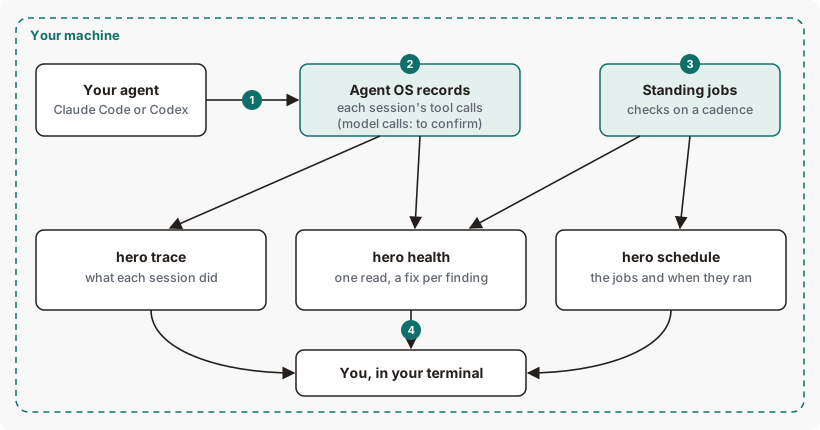
You use Claude Code or Codex as you normally do. Agent OS records each session: the agent's own tool calls. Standing jobs run checks such as health and eval on a cadence. You read the results with three commands: hero trace for what each session did, hero health for one read with a fix for each finding, and hero schedule for the standing jobs.
Observability concepts
| Term | What it means |
|---|---|
| Session | One run of Claude Code or Codex, from start to finish. The hero trace table also lists Agent OS jobs, which have no agent. |
| Trace | The record of one session: its tool calls, model calls, refusals, tokens and estimated cost. |
| Violation | A policy check in a session that didn't pass. hero trace violations lists the newest. |
| Area | One of the four groups hero health reports on: Govern, Optimize, Assure and Ledger. |
| Finding | Something hero health found, with an area, a severity and a fix. |
| Standing job | A check Agent OS runs for you on a cadence: eval, health, efficiency and codify. |
| Floor and live cadence | The floor is the slowest a job may run, which you set. The live cadence is how often it runs now. |
The path of a session, step by step
- You use your agent as you normally do.
hero setupconnected Claude Code and Codex to Agent OS. - Agent OS records the session as your agent works: the agent's own tool calls, such as shell commands and edits.
- Standing jobs run on a cadence on your machine, as a service that starts at login and restarts after a crash.
- You read what happened:
hero tracefor each session,hero healthfor the overall read, andhero schedulefor when each job ran.
Where you see observability
| Where | What it shows you |
|---|---|
hero trace | Each session: tools, model calls, refusals, tokens and estimated cost. Replays one session, and lists violations. |
hero health | One read across Govern, Optimize, Assure and Ledger: spend, findings by area, and a fix for each. |
hero schedule | The standing jobs, their cadence, whether each is on, and when it last ran. |
/hero:trace and /hero:health in your agent | Installed by hero setup. Your agent runs the command and explains the result. |
hero verdict | Job results, which hero trace points to. |
How observability decides what to show first
hero traceshows sessions with problems first, then the rest.hero healthlists findings most severe first. A cost finding is rated by size (high from $100 in the window, medium from $20); other findings have a fixed rating per check. An area fails when it carries a high finding. Each finding names its fix: a command, or a change to make in your agent.hero scheduleruns a job daily again whenhero healthreports a high finding for it, and relaxes back toward its floor after clean runs. It never runs a job less often than the floor you set.
Observability data, and what leaves your machine
| Data | Where it's kept | Contains | Leaves your machine? |
|---|---|---|---|
| Session traces | Your machine | Each tool call, which may include its input and command text (hook records redact recognized secrets and limit a target to 200 characters), plus model calls, refusals, tokens and estimated cost. | No, by default. |
| Standing job results | The schedule log on your machine | One status line per job run | No |
| Usage beacon | Not sent by hero trace or hero health. Scheduled jobs run through the normal command path, so an eligible job can trigger the beacon check, but each one doesn't send a beacon. The model gateway asks for it when it starts, not on every call it forwards. Whether one is sent depends on whether it is enabled, whether this is an install or upgrade, and the once-a-day limit. | A random install id, version, OS family and event. No content. | Only where sent. Usage reporting is on by default. It sends metadata only — never content, prompts or responses — at most once a day. Turn it off with HERO_BEACON=off. |
| Health findings | Read from your local records when you run hero health | Spend, calls, and findings by area | No. Health reads local evidence; it does not upload those findings. |
hero health reads its findings from your local records: spend, calls, and findings by area.
A trace record has these fields: trace_id, action, job_id, spans, created_at and execution_identity. Each span has span_id, trace_id, type, actor, name, parent_id, job_id, start, end, status, attributes, fingerprints, boundary_verdict, content_hash and backlog_item_id. The keys inside attributes and fingerprints depend on what recorded the span, so they aren't a closed list. A model-call span records the enrolled agent identity, as agent_identity, and, when Agent OS knows it, the agent session the call belongs to, as session_id.
When part of observability fails
| What fails | What you see | What happens to the work |
|---|---|---|
| Your trace history passes 64 MB | hero trace refuses with exit code 3 and says the history is larger than it can read at once. | New sessions are still recorded. |
| A standing job fails | hero schedule run marks it ✗ with its first line of output, and exits 1. | The other jobs still run. |
| The schedule service stops | hero schedule --service-status shows it. | Installed as a service, it restarts after a crash and at login. |
| Two schedule runs start at once | The second says another run is in progress, and starts nothing. | The first runs the due jobs. |
Observability on Claude Code and Codex
| Claude Code | Codex | |
|---|---|---|
Sessions in hero trace | Yes, agent claude | Yes, agent codex |
| Standing jobs | Same on both. They run on your machine, not inside either agent. | |
What you can change in observability
| Setting | Default | Effect |
|---|---|---|
hero schedule set <skill> <cadence> | eval, health and codify daily; efficiency weekly | Sets a job's floor. See the cadences. |
hero schedule on|off <skill> | All on | Switches one standing job on or off. An off job stops without a restart. |
HERO_HOME | ~/.hero | Where Agent OS keeps its files on your machine. |
See observability for yourself
Run these on your own machine to watch each step.
# Step 2: the sessions Agent OS recorded
hero trace

# Step 3: the standing jobs and when they last ran
hero schedule

# Step 4: one read across your agents
hero health
To read each one line by line, see hero trace, hero health and hero schedule.
Observability limits and next steps
| Limit | Behaviour | What to do |
|---|---|---|
| Health and your hooks | hero health doesn't check that your agents' hooks are installed and approved, and can say your rules hold when the rules file can't be read. | Run hero status to confirm hooks are active. |
Health against hero eval and hero route | Health's eval and routing status can disagree with those commands, for example Assure ✓ while hero eval gate says there is no baseline. | Trust the command. |
hero trace export | The export can include your local session id. | Review an export before you share it. |
See the limits of hero trace, hero health and hero schedule.
Checked against Agent OS 0.1.36rc14 (build 599c5e120c18) on 17 Nov 2026.