How Ekamyth Agent OS connects to Claude Code and Codex
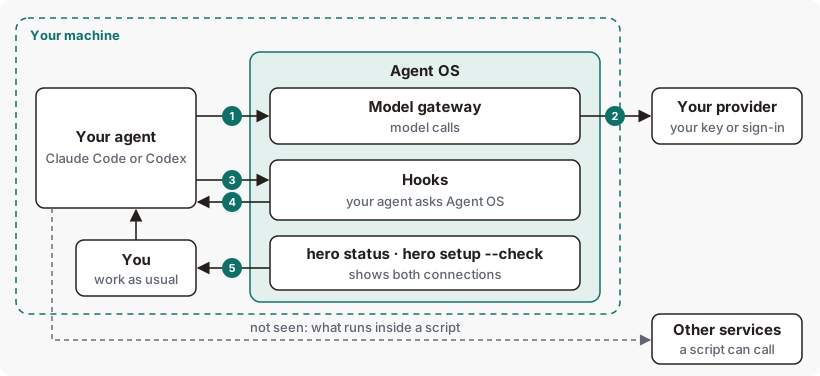
Agent OS works inside the agents you already use. Their model calls pass through the model gateway on your machine, and their hooks call Agent OS at set moments in each session, such as before a tool call.
How does Agent OS connect to your agents?
Agent OS doesn't replace Claude Code or Codex, and you keep your own provider account. It connects to each agent in two places, both on your machine.
The model gateway is where your agent's model calls go. It passes each call to your provider, with your own key or your agent's own sign-in, and returns the answer. Hooks are a feature of Claude Code and Codex: at set moments, the agent calls Agent OS and waits for its answer before it goes on. hero setup makes both connections after showing you its plan, and hero setup --undo takes them back out.
Connection concepts
| Term | What it means |
|---|---|
| Model gateway | The part of Agent OS that your agents' model calls pass through on their way to your provider. It listens only on your own machine. The command that starts it is hero proxy, and command output, such as hero status, calls it the proxy. See the path. |
| Hook | A moment in a Claude Code or Codex session when the agent calls Agent OS, such as before it runs a tool. See what each connection covers. |
| Setup | hero setup, which connects the agents it finds on your machine, after asking you. See hero setup. |
| Activation | Linking this machine to your Ekamyth account. Until it's done, nothing is connected and no background service starts. See Activation. |
| Posture | How Agent OS treats tool calls your rules don't cover. Every install starts on the builder posture. See how it decides. |
| Slash commands | The 12 /hero: commands setup adds to Claude Code, and the matching skills it adds to Codex. See Commands inside your agent. |
| MCP wrapper | hero mcp wrap <server>, which you add to your agent's MCP configuration for one server at a time, so each call to that server is checked first. Setup doesn't add it. See How MCP works. |
The path of your agent's work, step by step
Before these steps, you install Agent OS and run hero setup. The install line runs setup for you. See Get started.
- Your agent sends a model call to the model gateway. Setup pointed Claude Code and Codex there.
- The model gateway sends it to your provider with your key or your agent's own sign-in, and returns the answer to your agent. Routing is on by default, so Agent OS can send a call to a different model.
- At set moments, your agent calls Agent OS through a hook and waits: when a session starts, when you send a prompt, before and after each tool call, and at the end of a turn.
- Agent OS answers. It lets the tool call run, adds context such as your saved memory, or refuses the call and says why.
- You check the connections with
hero statusandhero setup --check.
What each connection covers
The model gateway carries model calls only. Your agent's tools reach Agent OS through the hooks. Some things reach neither.
| What your agent does | Model gateway | Hooks |
|---|---|---|
| Calls a model | Passes through | None |
| Reads or edits a file, or runs a shell command | None | Seen before and after the call |
| Fetches a page or searches the web in Claude Code | None | Seen as a tool call |
| Uses a web search your provider runs on its side | Doesn't reach Agent OS | Doesn't reach Agent OS |
| Calls an MCP tool | None | Seen as a tool call |
| Runs a script or program | None | The command is seen. What runs inside it isn't, so a script can call a service directly. |
What Agent OS does at each hook:
| Moment | What Agent OS does |
|---|---|
| A session starts | Adds your saved memory to the session as context. See How Brain works. |
| You send a prompt | Notices a standing rule you state in chat. If the model gateway isn't running, it stops the prompt from being sent and tells you how to start it. |
| Before a tool call | Checks the call against your rules and the posture. It can refuse the call. |
| After a tool call | Records what ran. |
| The end of a turn | Checks the reply against facts you've recorded. See Claude Code and Codex for how each agent handles a conflict. |
How Agent OS decides what passes
- Setup asks first. It prints its plan and waits for your yes. With no terminal to ask on, it changes nothing unless you pass
--yes. - Setup never points an agent at a model gateway that isn't answering. If the model gateway isn't answering, or the one answering belongs to another install, setup leaves that agent's model route as it is, so the agent keeps reaching its provider directly.
- Every install starts on the builder posture. Agent OS records each tool call, always refuses a short list of dangerous command shapes, and lets the rest run. Your rules are checked as code and recorded; they block once enforcement is on. For the list, see How governance works.
- Rules in your rule files are checked as code. Setup lists the rules in your project's
CLAUDE.md,AGENTS.mdand memory files. To enforce them, runhero init CLAUDE.mdin your project, orhero initwith another rules file. Rules in your user-level~/.claude/CLAUDE.mdor~/.codex/AGENTS.mdaren't enforced. When a registered rule is written in one of the shapes Agent OS checks as code and matches a tool call, the match is recorded. Once enforcement is on, the call is refused: on Claude Code, and for shell commands on Codex. A rule in any other wording reaches the agent in context, as guidance. Seehero init. - Routing is on by default. To keep every call on the model your agent asked for, see What you can change.
What the connections keep, and what leaves your machine
- Your prompts and responses go to your provider, as they did before. Agent OS's own record of each model call holds no prompt or response text.
- Before setup changes one of your agent's settings files, it keeps a copy of that file beside it.
- Activation, by install token or by
hero setup redeem, sends your Install id, the secret code and a separate random activation id for this installation to Ekamyth. - After you redeem a code, the plan check can send this install's random installation id to check learned-routing access. Rule compilation can send a tokenized rule template and request metadata, with automatic sending paused by default and manual compilation still able to send when an Ekamyth key is configured. For every flow, see What Agent OS may send, and when.
To see what may leave this machine and what actually left, run hero privacy.
When a connection fails
| What fails | What you see | What happens to the work |
|---|---|---|
| The model gateway stops | It runs as a background service that restarts itself. When you send a prompt while it's down, the prompt isn't sent, and the message names the command that starts it. | Model calls from a connected agent fail until it's back. |
| The model gateway isn't answering when you run setup | Setup says NOT written: proxy not reachable for that agent. | That agent's model route is left as it was, so it keeps reaching its provider. |
| An optional step in the model gateway fails, such as routing | — | The call goes on. If a safety step, such as a budget or rule check, can't answer, the call is refused. |
| A hook can't read your rules or its own input | The tool call may be refused, in the agent's own refusal format. | The call doesn't run. |
| Claude Code stops the check at its own 15-second hook limit, or kills it | — | That one call runs unchecked. |
| On Codex, the check can't run, fails or doesn't answer within 120 seconds | Ekamyth could not check this action, so it refused it: <reason> [<code>]. Run: hero setup --check | The call doesn't run. |
| Codex hasn't approved the hooks | hero status shows Codex hooks not approved yet, with the step to approve them. | Codex runs a hook only once it's approved. |
| Codex's hooks feature is off | hero status names the step: codex features enable hooks. | Codex runs no hook at all. |
Connections on Claude Code and Codex
| Claude Code | Codex | |
|---|---|---|
| Where setup points model calls | ANTHROPIC_BASE_URL in ~/.claude/settings.json | A model provider in ~/.codex/config.toml, plus OPENAI_BASE_URL for shells Codex starts |
| Hooks | 5 | 6. Codex approves them through its own hook approval. The end-of-turn hook needs Codex 0.114.0 or later. |
| Slash commands | 12 /hero: commands | 12 skills |
| Saved memory at session start | Yes | Wired by setup |
| A reply that conflicts with your recorded facts | Agent OS asks the agent to fix the reply. | You see a warning. Codex's end-of-turn hook can't take an instruction, so the agent isn't asked. |
| Conversations started before setup | — | When setup can't read Codex's conversation list, it says it can't tell whether those conversations still go straight to OpenAI. |
What you can change in the connections
| Setting | Default | Effect |
|---|---|---|
hero setup --proxy <url> | http://127.0.0.1:8081 | Points your agents at a model gateway at another address. See --proxy. |
HERO_PROXY_PORT=<port> | The port saved at install, else 8081 | The port the model gateway uses. See hero proxy. |
| Routing off | Routing on | Set HERO_ROUTE=0 in the model gateway process's environment and restart the model gateway to turn routing off, as described in Turn routing off. |
HERO_BRAIN_SESSION_MEMORY=off | On | Stops adding your saved memory at session start. |
hero codify enforce off | Armed after setup | Stops your rules from blocking tool calls. See hero codify. |
EKAMYTH_INSTALL_NO_SERVICE=1 | Unset | Installs with no background services, and skips the daily job that keeps your rules in sync. |
hero setup --undo | Takes both connections out of your agents. See Example 5. |
See the connections for yourself
Run these on your own machine.
# Both connections are configured: 8 checks, all ok
hero status

# Each agent's model route, hooks and slash commands
hero setup --check
Then open a new Claude Code session and type /hero:health. To read the output line by line, see How to read hero status output and Example 1 of hero setup.
Connection limits and next steps
See Limits of hero setup, Limits of hero proxy and Limits of install, upgrade and remove.
Checked against Agent OS 0.1.36rc14 (build 599c5e120c18) on 17 Nov 2026.