How context loading works
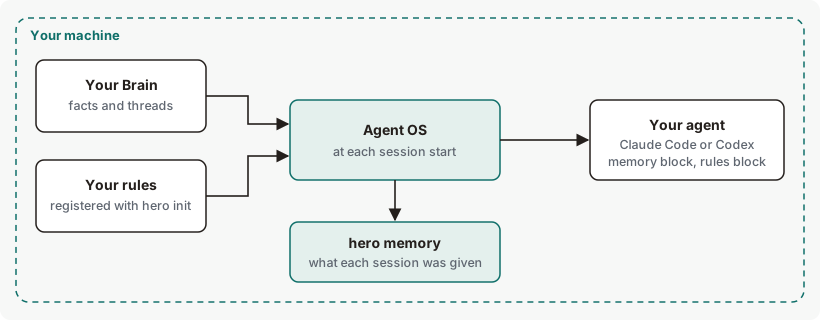
When a Claude Code or Codex session starts, Ekamyth Agent OS gives your agent two blocks of context: session memory from your Brain, and your registered rules for the project. hero memory shows which rules Agent OS gave each session at start.
How does context loading work?
At session start, resume, clear and compaction, Agent OS gives your agent what you've told Agent OS about yourself and your work, and the rules you've set for this project, with nothing for you to run.
Agent OS adds the two blocks separately, each under its own heading. Session memory is context only. The rules block lists the active rules for the project and for you; mechanical rules are also checked when your agent calls a tool. In some projects the session-start rules block can be missing or incomplete. Rules your CLAUDE.md or AGENTS.md already carries aren't repeated. Agent OS keeps a note of which rules it gave each session, and hero memory reads it back to you.
The load audit is a simulation
hero memory also runs a load audit: a simulation of which rules would fit a budget, with critical rules always kept and rules on other topics routed out for a task you describe. It is labelled as simulated on screen. It doesn't change what your agent is given, and its numbers differ from what a session gets.
Context loading concepts
| Term | What it means |
|---|---|
| Session memory | The Brain block: lines that fit this project, and a saved thread when one is shown. See How the Brain works. |
| Registered rules | The rules Agent OS knows for this project and for you: rules from your rules file, registered with hero init, and rules you state in chat. |
| Rules block | The block that lists your registered rules at session start, under its own heading. |
| Checked at the tool call | A mechanical rule Agent OS also checks as code when your agent calls a tool. It blocks once enforcement is on. The rules block marks it [enforced at tool call]. |
| Critical rule | A rule you mark as critical, so the load audit always keeps it. You mark it with risk_class: critical or file it under a ## Critical heading. |
| Receipt | Agent OS's local note of which rules a session was given, by rule id and count, without the rule text. |
| Load audit | The simulation in hero memory. See The load audit is a simulation. |
How Agent OS chooses what goes into a new session
| Block | What goes in | What stays out |
|---|---|---|
| Session memory | Brain lines that fit the project the session opened in, and a saved thread when one is shown, within a budget. See How the Brain chooses. | Lines for other projects, junk and duplicates. The block says how many it left out. |
| Rules | Every active registered rule for this project and for you. Rules are not chosen by task or ranked by relevance. Secrets in a rule's text are masked. | Retired, switched-off and expired rules, and rules your CLAUDE.md or AGENTS.md already carries. When the block is full, its last line counts the rules that didn't fit. |
A rule registered during a session reaches the next session. You control what goes in: your Brain, your rules file, which rules are critical, and whether session context is on. See What you can change.
What leaves your machine
Both blocks are built on your machine and become part of your agent's session context, which your agent sends to your model provider under your own account. Receipts stay on your machine: the agent, the session, the project, which rule ids were given and how many, with no rule text. Agent OS doesn't send these receipts to Ekamyth. The blocks themselves go to your agent as context, as above.
When you run hero memory, Agent OS can send a usage beacon. Usage reporting is on by default. It sends metadata only — never content, prompts or responses — at most once a day. Turn it off with HERO_BEACON=off. When enabled and due during use, the beacon carries a random install ID, version, coarse platform and event, with heartbeats at most once per 24 hours and install or upgrade attempts at least 15 minutes apart.
When something goes wrong
A failure here never stops a session from starting. The block that failed says so in place of its content.
| What happens | What you see | What happens to the work |
|---|---|---|
| Your registered rules can't be read | The rules block reads Ekamyth rules: registered rules could not be loaded (registry_unreadable). | The session starts without your rules in context. |
| The receipt can't be written | Ekamyth rules: injection receipt could not be written (receipt_write_failed). in place of session memory | The session starts with your rules and without session memory. |
| A session had more mechanical rules than fit | hero memory shows a ✗ line: the extras were neither in context nor checked as code, unless compiled | Those rules didn't reach that session. The line points to hero codify. |
| Session memory fails | See When something goes wrong with the Brain. | The rules block still loads. |
| No session has started | No session injection receipts yet — registered rules reaching your agent are not verified. | Nothing to check until a session starts. |
Context loading on Claude Code and Codex
| Claude Code | Codex | |
|---|---|---|
| Memory block and rules block at session start | Yes, though in some projects the rules block can be missing or incomplete | Yes, though in some projects the rules block can be missing or incomplete |
| Rules not repeated when your own file carries them | CLAUDE.md | AGENTS.md |
| Room for each block | Smaller on Codex than on Claude Code. | |
| Marks on mechanical rules | The rules block can mark a rule [mechanical; not armed] while the rule is blocking calls. The rule is still enforced, and hero enforce shows its true state. A call on the always-refused list is refused either way: on version 0.1.36rc13, Codex's rules block reads - [mechanical; not armed] Never run `rm -rf` on any path. while rm -rf is refused on both agents as part of the always-refused list. | |
What you can change in context loading
| Setting | Default | Effect |
|---|---|---|
Your rules file, through hero init | No rules registered | What the rules block lists. See hero init. |
risk_class: critical, or a ## Critical heading | Not critical | Marks a rule as critical: the load audit always keeps it, and hero memory lists it under CRITICAL RULES. |
HERO_BRAIN_SESSION_MEMORY=off | On | Turns off session context: neither the memory block nor the rules block is added. |
HERO_MEMORY_MAX_TOKENS=<n> | 30000 | The token budget for the load audit only. |
HERO_MEMORY_MAX_ENTRIES=<n> | 200 | The rule budget for the load audit only. |
See context loading for yourself
After a few sessions with your agents, run these from inside your project. None of them change your rules or sessions.
# Which rules Agent OS gave each session, and the load audit
hero memory

# Every session, newest first
hero memory list

# The load audit, for a task you describe
hero memory write a python function and commit it
For the output, see Example output.
Context loading limits and next steps
See Limits of hero memory and Limits of hero brain.
Checked against Agent OS 0.1.36rc14 (build 599c5e120c18) on 17 Nov 2026.