hero health
Gives one read of how your agents are doing across Govern, Optimize, Assure and Ledger, with a fix for each finding.
What hero health does
It answers one question: how are my agents doing, overall? It reports on the last 30 days recorded on your machine: estimated spend, how many of the four areas are failing, and each finding with its severity and its fix. Each fix is a command to run, or a change to make in your agent.
- Use it when you don't know which command you need. It tells you where you're off track and what to run next.
- Use something else when you want what one session did (
hero trace), cost across every lever (hero efficiency), or which model served each call (hero route). To check whether Agent OS's own parts are running, such as the model gateway, the hooks and enforcement, runhero status, or open the Health tab in Monitor, which shows one tile per capability. - Alias: none.
- Reads or changes:
statusandlistread your records and change nothing in your work. A read creates Ekamyth Agent OS's local record on your machine if it's missing.--htmlwrites a report file and opens it.hero healthsends no usage beacon.
Spend is an estimate at public list prices, unless HERO_BILLING_RATES points at your own rate card. An area fails when it carries a high finding, and then the command exits 1. What you see depends on your machine: a model gateway that isn't answering is a high finding when Claude Code or Codex is installed, or after hero setup, and a medium finding only on a machine with neither.
Synopsis for hero health
hero health [status] [--json] [--details] [--html]
hero health list [--all] [--details] [--html]
hero health describe [--json]
hero health help
Run with no subcommand, it behaves as status. hero health --help shows --json and --details as a choice; they also combine. See Example 4.
Subcommands of hero health
| Subcommand | What it does | Reads or changes |
|---|---|---|
status | The verdict for each area and every finding in one table, with one command to run next. This is the default. | Reads |
list | Findings, most severe first. The first page of 10 by default. | Reads |
describe | The command's own descriptor. Reads none of your data and sends no beacon. | Reads |
help | This command's help. Same as --help and hero help health. | Reads |
Arguments for hero health
Arguments for status
| Argument | Type | Required | Default | What it does |
|---|---|---|---|---|
--json | Flag | No | Off | Machine-readable output with data and envelope. data holds the headline, each area's state, and the findings. |
--details | Flag | No | Off | Replaces the table with the evidence view: the governance posture, each area's state, the top five findings plus any model gateway finding, and the attestation lines. Shared numbers show as numerator/denominator, with the reasons a figure is partial. |
--html | Flag | No | Off | Writes the report to <HERO_HOME>/report.html (default ~/.hero/report.html), prints report → <path>, and opens the file in your default browser. It overwrites the file each run, and exits with the same code as the text view. It takes precedence over --json. |
--all is for list only: status --all is refused. describe takes only --json.
Arguments for list
| Argument | Type | Required | Default | What it does |
|---|---|---|---|---|
--all | Flag | No | Off, first page of 10 | Shows every finding, not only the first page. |
--details | Flag | No | Off | Prints the facts behind the read, with the reasons any figure is partial. It doesn't print the findings. |
--html | Flag | No | Off | As for status. |
How hero health builds its read
hero health reads what Agent OS has recorded about your agents' work on your machine, across Govern, Optimize, Assure and Ledger. It groups what each capability found by area, sorts the findings most severe first, and gives each one its fix. A standing job runs it daily for you; see hero schedule. For the whole picture, see How observability works.
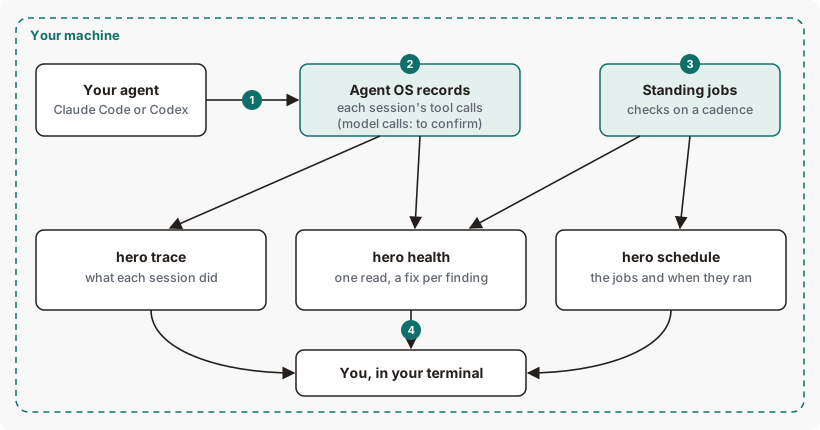
hero health is the one read across everything Agent OS records.Get started with hero health
Before you start: Agent OS is installed. What you see first depends on your machine. With nothing recorded and no agent installed, you see the first view under Example output. With Claude Code or Codex installed, or after hero setup, and the model gateway not answering, you see a high Govern finding.
See how your agents are doing.
hero healthYou should see the window, spend, how many areas are failing, and every finding. See Example output.
See the findings, most severe first.
hero health listYou should see one row per finding, with its area, severity and fix. See Example 1.
See the evidence behind each number.
hero health --detailsEach shared number appears as numerator/denominator, followed by the reasons any figure is partial.
Nothing here changes your work, so there's nothing to undo.
Example output of hero health
Before anything is recorded
Output from version 0.1.36rc13. Trimmed where you see …
Codex users run hero codex.
With recorded work
Example output on a demo home; the numbers are examples. Trimmed where you see …
How to read hero health output
| Line | What it means | Where it comes from | What to do |
|---|---|---|---|
| 1, 4. Window | The rolling 30 days every figure covers, in UTC. | Your local records. | No action is required for the window label; it identifies the period covered by the report. |
| 2. Nothing measured yet | No agent work has been recorded in the window. | Your local records. | Use your agent, then run this again. |
| 3. Run, before anything is recorded | Run: hero claude. It prints only on an empty install, before the first call. | The report. | Run it. Codex users run hero codex. |
| 10. Run | Exactly one command to run next. | The report. | Run it. |
| 5. Spend | Tokens, calls and estimated cost in the window. | Your local records, priced on the rate card. | For cost by lever, run hero efficiency. |
| 6. Areas and findings | How many of the four areas are failing, how many findings there are, and how many are high. A phrase on your governance posture always follows, such as govern not wired. | Your local records. | Read the phrase; fixes for findings are in the findings table (line 7). The phrases and what to do: govern enforcing — dangerous actions are refused (nothing to repair); govern builder — records all calls; stops a short list of catastrophic actions (the normal state of a new install); govern observing — dangerous actions pass through; BUILDER floor refuses (if you didn't mean to observe, check the enforcement setting; HERO_GOVERN_ENFORCE=1 in the agent's launch environment asks for enforcement, unless a higher-priority setting overrides it); govern unavailable — the govern owner could not be consulted (look at hero govern); govern not wired — no Ekamyth hook or proxy acts on the policy here (run hero setup, then hero setup --check); govern policy not in force — every agent action is refused and govern policy file broken — only the catastrophic guard is active (run hero govern init, which keeps the bad policy file beside the new one). |
| 7. Findings table | One row per finding: its area, its severity (HIGH, MED or LOW), what was found, and the fix. | What each capability found. | Start with the top row. |
| 8. A high finding | A high finding makes its area fail, and the command exit 1. | What each capability found. | Run the command in the fix column. |
| 9. A fix with no command | Some fixes are a change to make in your agent, and say so. | What each capability found. | Make the change in your agent. |
| 11. Area marks | One mark per area. ✗: failing, with a high finding. !: findings, none high. ✓: no findings, and real activity was measured. ?: no findings and nothing measured, which is not a pass. A ? can carry (nothing measured yet) or (meter not read). | The report. | Use --details to see the evidence. |
More hero health examples
Example 1. To see the findings
hero health listOutput from version 0.1.36rc13. Trimmed where you see …
Agent health findings · rolling 30d (Oct 07–Nov 06 UTC)
  3 findings, most severe first
  ┌──────────┬─────┬─────────────────────────────────────────┬─────────────────┐
  │ area     │ sev │ finding                                 │ fix             │
  ├──────────┼─────┼─────────────────────────────────────────┼─────────────────┤
  │ Optimize │ MED │ no Core registry push received —        │ hero help route │
  │          │     │ routing on the wheel seed (may miss new │                 │
  │          │     │ models)                                 │                 │
  ├──────────┼─────┼─────────────────────────────────────────┼─────────────────┤
  …
  │ Assure   │ LOW │ no eval baseline — quality unmeasured / │ hero help eval  │
  │          │     │ drifting                                │                 │
  └──────────┴─────┴─────────────────────────────────────────┴─────────────────┘
  nothing measured yet — run your agent through `hero run` to capture your first call, then re-run this command
Findings can appear before any agent work is recorded. On a fresh install of this build, the list held these three.
Example 2. To see every finding
hero health list --allThis prints every finding, not only the first page of 10.
Example 3. To open the report as a page
hero health --htmlThis command will:
- Write the report to
<HERO_HOME>/report.html(default~/.hero/report.html), replacing any earlier report there. - Open it in your default browser.
The page shows how many areas are failing, the findings table, one card per area with its mark, and the Run: line. Its footer says it holds no prompts or responses and is safe to share. It has no scripts and no web links.
Example 4. To use the read in a script
hero health --jsonField in data | What it holds |
|---|---|
pillars | Each area's state: failing, attention, ok or unmeasured. |
failing_pillars | The failing areas. Not empty means exit code 1. |
govern_posture | enforcing, builder, observing or unavailable. |
govern_wired | Whether governance acts on your rules on this machine: true, false or null. |
findings | Every finding, uncut, each with skill, bucket, title, impact, unit, severity and fix_action. |
--details --json returns the same fields.
Use the exit code to check health in a script: 1 means at least one area is failing.
Exit codes and errors for hero health
| Code | Meaning | What to do |
|---|---|---|
0 | The output asserts a positive result, or is advice with no verdict. | Nothing. |
1 | At least one area is failing, because it carries a high finding. | Run the fix for the high finding. |
2 | Refused: unknown flag or subcommand, not configurable, or unavailable. | Read the governing_rule line and run the remedy, usually hero health --help. |
3 | A source it needs is unavailable at runtime. | Email support at the address in your welcome email, with the output you saw. |
A refusal prints refused, reason, governing_rule and remedy lines, or the same four keys with --json.
| Reason | Cause | Fix |
|---|---|---|
unknown_verb | An unknown subcommand, such as hero health bogus. | Run hero health --help. |
unknown_flag | An unknown flag, or --all on status. | Run hero health --help. |
not_configurable | An attempt to switch hero health on or off, such as hero health disable. | None. Use hero health --details to see the read. |
health describe takes only --json (got '<flag>') | describe was given another flag. | Use hero health describe --json. |
Files and environment for hero health
| Name | Kind | Purpose |
|---|---|---|
HERO_HOME | Environment variable | Root of Agent OS's files on your machine. Default ~/.hero. |
HERO_BILLING_RATES | Environment variable | Path to your own rate card. Spend figures use it. Without it, spend is at public list prices. See Use your own rates. |
HERO_PROXY_PORT | Environment variable | The model gateway port the check probes. Default: this install's port, otherwise 8081. |
<HERO_HOME>/report.html (default ~/.hero/report.html) | File, written by --html | The report page. Replaced on each run. |
Limits of hero health
| Limit | Behaviour | Can you change it? | What to do |
|---|---|---|---|
| Window | Every figure covers 30 days. There's no option to change the window. | No | None. |
| Result depends on the machine | With Claude Code or Codex installed, or after hero setup, a model gateway that isn't answering is a high finding, so the command exits 1. On a machine with neither, the same state is a medium finding. | No | Start the model gateway with the command in the fix column. |
| Narrow terminals | The table fits your terminal width down to a minimum, then runs wider. | No | Widen the terminal, or use --json. |
| Fixes with no command | Some findings name a change to make in your agent, with no hero command to run. | No | Make the change the fix column describes. |
--html | Opens a browser on every run. There's no option to write the file without opening it. | No | Find the file at the path printed after report →. |
| Monitor's Health tab | It doesn't yet check that your agents' hooks are installed and approved, and can say your rules hold when the rules file can't be read. Its eval and routing status can disagree with hero eval and hero route. On an Enterprise install with no hook set up, it can say tool calls are checked when they aren't. | No | Run hero status to confirm hooks are active, and hero govern status for what is checked. Trust the CLI where they differ. |
/hero:health in your agent | Installed by setup. | No | Run hero health in your terminal. |
Commands related to hero health
Checked against Agent OS 0.1.36rc14 (build 599c5e120c18) on 17 Nov 2026.