hero mcp
Puts the Ekamyth Agent OS MCP wrapper in front of an MCP server you already use, and lets you check and decide the calls it holds. With no subcommand, it is Agent OS's own small MCP server.
What hero mcp does
It answers: which of my MCP calls are checked before they run, and how does my agent reach Agent OS over MCP? Run with no subcommand, it is Agent OS's own MCP server, for an agent that already uses MCP, such as Claude Code or Codex. status, approve and deny work with the MCP wrapper, which you set up per server; see The MCP wrapper.
- Use it when you want your agent to read Agent OS's held calls, record status or Brain over MCP, or decide a call the wrapper is holding.
- Use something else when you want to see what needs your decision across Agent OS (
hero inbox), or set the policy wrapped calls are checked against (hero govern). - Reads or changes:
statuschanges no setting or held call.approveanddenydecide one held call. With no subcommand, it serves until your agent closes it.
Agent OS doesn't provide an MCP SDK or a way to build MCP servers. It installs the MCP SDK only for its own use, in an environment only Agent OS uses. The wrapper works with a local MCP server already defined in your Claude Code or Codex configuration, one server per wrapper entry. Nothing here is set up for you. You add hero mcp or the wrapper to your agent's MCP configuration yourself, and hero mcp never edits that configuration.
Synopsis for hero mcp
hero mcp
hero mcp status [<server>]
hero mcp approve <invocation-id>
hero mcp deny <invocation-id>
hero mcp wrap <server>
hero mcp help
For wrap, see The MCP wrapper. There are no flags.
Subcommands of hero mcp
| Subcommand | What it does | Reads or changes |
|---|---|---|
| (none) | Runs Agent OS's MCP server over standard input and output, for your agent to start. It offers eight resources and two tools; see Example 1. It stops when your agent closes it. | Reads; its deny tool changes one held call |
status | One JSON line about one server in your agent's config: whether it goes through the wrapper, whether a wrapped call has been recorded, and whether the wrapper is running. | Reads |
approve | Releases one held call, after you confirm at your own terminal. Refused when an agent runs it. | Changes |
deny | Refuses one held call. | Changes |
wrap | Runs one of your MCP servers behind the wrapper. Your agent starts it from its config. See The MCP wrapper. | Changes held calls and records |
help | This command's help. Same as --help and hero help mcp. It doesn't list the subcommands. | Reads |
Arguments for hero mcp
| Argument | Applies to | Type | Required | Default | What it does |
|---|---|---|---|---|---|
<server> | status | Server name | No | Your only configured server | The entry to report on, by its name in your agent's MCP config. With none given, exactly one server must be configured. |
<server> | wrap | Server name | Yes | None | The server to wrap, by its name in your agent's MCP config. |
<invocation-id> | approve, deny | mcpinv- and 32 hex characters | Yes | None | The held call, as your agent was told when it was held. |
--json isn't an option: status always prints JSON, and status --json looks for a server named --json.
How hero mcp works
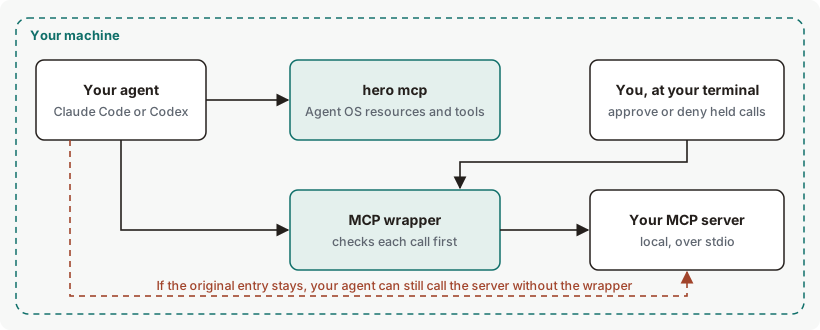
Your agent starts hero mcp, or a wrapper, the way it starts any local MCP server: from an entry in its MCP configuration. The wrapper reads your server's definition from that configuration, starts it, and checks each call against your Agent OS policy before it runs. A held call waits for you; approve and deny reach the wrapper that holds it. See How MCP works with Agent OS.
Get started with hero mcp
Before you start: Agent OS is installed, and your agent has at least one MCP server in ~/.claude.json or ~/.codex/config.toml.
Check one of your servers.
hero mcp status <server>For a server that doesn't go through the wrapper, you should see
"coverage": "inventory-only". See Example output.Add Agent OS's MCP server to your agent. An entry of this shape goes in
~/.claude.jsonundermcpServers:"hero": {"command": "hero", "args": ["mcp"]}
To undo step 2, remove the entry from your agent's config.
Example output of hero mcp
Status of one server
hero mcp status <server>One line, for each state:
Example output. The format is the command's; the numbers are examples.
| State | Output |
|---|---|
| Not wrapped | {"coverage": "inventory-only", "invocation_proof": "not-observed", "wrapper_health": "unknown"} |
| Wrapped, wrapper not running | {"coverage": "governed", "invocation_proof": "not-observed", "wrapper_health": "unreachable"} |
| Wrapped, wrapper running | {"coverage": "governed", "invocation_proof": "not-observed", "wrapper_health": "live"} |
| Wrapped, running, after a recorded call | {"coverage": "governed", "invocation_proof": "receipted", "wrapper_health": "live"} |
How to read hero mcp output
| Field | Values | What it means | What to do |
|---|---|---|---|
coverage | governed, inventory-only | Whether this config entry runs through the wrapper. It describes the entry, not the server: the server's original entry reads inventory-only even while a wrapper for it runs. | Name the wrapping entry to see its coverage. |
invocation_proof | receipted, not-observed | Whether any wrapped call to this server has ended with a recorded receipt. | Nothing. |
wrapper_health | live, unreachable, unknown | live: the wrapper answers. unreachable: wrapped, but no wrapper is running. unknown: not wrapped. | A wrapper runs while the agent that started it is running. For unreachable, start the agent whose configuration uses the wrapper and recheck hero mcp status <server>; this status means the wrapper did not answer its local health probe. |
More hero mcp examples
Example 1. To give your agent Agent OS's MCP server
hero mcpThis command produces no output of its own. Your agent starts it and talks to it over standard input and output; it exits when that input closes. It speaks MCP protocol version 2025-11-25.
| Resource or tool | What it gives your agent |
|---|---|
hero://govern/approvals | Every call the wrapper has held, with its state: pending, denied, expired and the rest. No argument content. |
hero://attest/status | The status of your local Agent OS record: the same check as hero attest verify. |
hero://brain/soul, hero://brain/memory | Your Brain's identity and memory sections. |
hero://brain/para/projects, …/areas, …/resources, …/archive | Your Brain's projects, areas, resources and archive sections. A section over 256 KiB isn't served. |
Tool hero_govern_deny | Denies one held call by its invocation id. It can't approve. |
Tool hero_attest_verify | Runs the record check and returns its result. |
The MCP wrapper
By default, your agent's MCP tool calls reach Agent OS through its hooks: on Claude Code, and on Codex when the call reaches the hook. The MCP wrapper, which you set up per server, checks each call to one of your local MCP servers against your Agent OS policy before it runs. Nothing sets it up for you, and hero mcp never edits your agent's config. To wrap a server, keep its local server definition under its own name, and add a second entry with a different name that runs hero mcp wrap <server-name>; only calls through that second entry are covered. Check it with hero mcp status <entry-name>. To act on a held call, run hero mcp approve <invocation-id> in your own terminal, review the action, and type the exact confirmation it asks for; hero mcp deny <invocation-id> declines it.
Limits: no command marks a tool as reviewed, so out of the box every wrapped call waits for your approval, and the result of a call you approve doesn't reach your agent. Your agent can still call your server through its original entry, and those calls don't go through the wrapper. Agent OS doesn't stop that.
Your server must: be defined once across ~/.claude.json and ~/.codex/config.toml, run locally over standard input and output, have a command, have no env block or secret-looking arguments, and not be a wrapper itself.
When a call is held, your agent gets a tool error like this. The text says "refused" even though the call is only held; hero_state tells you which.
Example output. The format is the command's; the numbers are examples.
{"content":[{"text":"Hero refused the tool call","type":"text"}],"coverage":"governed","hero_state":"approval_required","invocation_id":"mcpinv-0123456789abcdef0123456789abcdef","isError":true,"receipt_id":null}Exit codes and errors for hero mcp
| Code | Meaning | What to do |
|---|---|---|
0 | Success: status, deny, a confirmed approve, and the server or wrapper when its input closes. | Nothing. |
2 | Refused or failed. Printed as hero mcp: <message>. | See the errors below. |
hero mcp has no exit codes 1 or 3.
| Error | Cause | Fix |
|---|---|---|
hero mcp: usage: hero mcp [wrap <server>|status [server]|approve <id>|deny <id>] | An unknown subcommand. | Check the synopsis. |
hero mcp: hero mcp status requires a server when configuration is ambiguous | status with no name, when you have no server or more than one. It reads "ambiguous" even with none. | Name the server. |
hero mcp: MCP server '<name>' was not found | No entry by that name in either agent's config. | Check the name. |
hero mcp: MCP server '<name>' is ambiguous | The name is in both ~/.claude.json and ~/.codex/config.toml. From wrap, the message names both files. | Keep the name in one file. |
hero mcp: MCP server '<name>' uses unsupported non-stdio transport | A remote server. | Only local servers can be wrapped. |
hero mcp: MCP server '<name>' has a secret-bearing command definition | An env block, or a secret-looking word in the command. | A server that needs a key in its environment can't be wrapped. See Limits. |
hero mcp: MCP server '<name>' recursively invokes Hero MCP | The named entry is itself a wrapper. | Wrap the original entry's name. |
hero mcp: MCP server '<name>' has an unreadable command | The entry has no usable command. | Fix the entry. |
hero mcp: invocation not found | No held call has that id. | Check the id. |
hero mcp: invocation cannot be denied | The call is no longer pending: already denied, expired or abandoned. | Nothing. |
hero mcp approve requires a controlling TTY | approve without a terminal. | Run it yourself in a terminal. |
approval refused | The confirmation you typed didn't match. | Run it again and type approve <invocation-id> exactly. |
A refused block ending run `hero mcp approve <id>` yourself in your own terminal | An agent ran approve. | Run it yourself in your own terminal. |
hero mcp: HERO_MCP is off | HERO_MCP=off is set. | Unset it to serve or wrap. |
hero mcp: AF_UNIX path too long | HERO_HOME is too long for the wrapper. | Use a shorter HERO_HOME, such as the default ~/.hero. |
Files and environment for hero mcp
| Name | Kind | Purpose |
|---|---|---|
~/.claude.json | Claude Code's config, which you edit | Its mcpServers entries are read by status and wrap. Never written by hero mcp. |
~/.codex/config.toml | Codex's config, which you edit | Its mcp_servers entries are read by status and wrap. Never written by hero mcp. |
HERO_MCP=off | Environment variable | Stops hero mcp and the wrapper from starting. status, approve and deny still work. |
HERO_CLAUDE_CONFIG | Environment variable | Reads another Claude Code config instead of ~/.claude.json. |
HERO_CODEX_CONFIG | Environment variable | Reads another Codex config instead of ~/.codex/config.toml. |
HERO_HOME | Environment variable | Root of Agent OS's files. Default ~/.hero. Keep it short for the wrapper; see Limits. |
Limits of hero mcp
| Limit | Behaviour | Can you change it? | What to do |
|---|---|---|---|
| Set-up | hero mcp doesn't add itself or the wrapper to your agent. You edit its config by hand. hero setup does not offer to add Agent OS's MCP server to your agent's MCP configuration. | No | See Get started and The MCP wrapper. |
| The original entry | Your agent can still call your server through its original entry, and those calls don't go through the wrapper. Agent OS doesn't stop that. | No | Treat calls through the original entry as unwrapped. |
| Every call is held | No command marks a tool as reviewed, so out of the box every wrapped call waits for your approval. | No | See The MCP wrapper. |
| Approved calls | The result of a call you approve doesn't reach your agent. | No | None. |
| Held calls expire | After 60 seconds. A wrapper restart abandons the calls it was holding. | No | Decide promptly. |
| Approving | Only you, at your own terminal, while the agent holding the call is running. | No | None. |
| What the approval shows | The tool's name and a fingerprint of the arguments, not the arguments. | No | Approve only when you recognise the tool and why it's being called. The approval shows the tool and a fingerprint of its arguments, not the arguments themselves. |
| Held and refused calls look alike | Both reach your agent as "Hero refused the tool call". Only hero_state differs. | No | Read hero_state. |
| Local servers only | Remote servers, and servers with an env block or a secret in the command, can't be wrapped. A server that needs a key in its environment can't be wrapped. | No | Remote servers, and servers that need a key or env settings, aren't wrapped. Their calls don't go through Agent OS's approval. |
| Versions | MCP protocol 2025-11-25 only. | No | Use an agent that supports MCP protocol 2025-11-25. |
HERO_HOME length | The wrapper fails when HERO_HOME is longer than about 50 characters on Linux. | Yes | Use the default ~/.hero, or a short path. |
| Denying after the wrapper stops | The denial is recorded without a receipt. | No | None. |
| Help | hero mcp --help prints a two-line header, then the usage line, with no subcommands listed. --help after a subcommand prints the general Agent OS help. | No | Use this page. |
Commands related to hero mcp
hero mcp serves.
hero attestThe record check hero mcp serves.
Checked against Agent OS 0.1.36rc14 (build 599c5e120c18) on 17 Nov 2026.