hero memory
Shows which of your registered rules Ekamyth Agent OS gave your agent at session start, and simulates which would fit a budget.
What hero memory does
It answers: which of my rules does my agent get, and was any of them silently dropped? It reads the receipts Agent OS keeps each time a session starts, and shows, per agent, how many sessions carried your rules, your critical rules, and the recent sessions. It also runs a load audit: a simulation of which rules would fit a budget, which critical rules are always kept, and which are routed out and why.
- Use it when you want to check that your rules reach your agent's sessions, or see what would load for a kind of task.
- Use something else when you want to see your Brain, including your memory file (
hero brain), which rules are checked as code at the tool call (hero enforce), or to register rules (hero init). - Reads or changes: it doesn't change your rules or sessions. A first read can create Agent OS's local record if it's missing, and a read can send a usage beacon; see Files and environment.
hero memory reports on the rules in your agent's context. Your memory file is part of your Brain, and hero brain shows it. The load audit is labelled as simulated on screen and doesn't change what your agent loads.
Synopsis for hero memory
hero memory [status] [--json] [--details]
hero memory <task text>... [--json] [--details]
hero memory list [--json] [--details]
hero memory describe [--json]
hero memory help
Run with no subcommand, it behaves as status.
Subcommands of hero memory
| Subcommand | What it does | Reads or changes |
|---|---|---|
status | Which rules your agent was given at session start, with the load audit summary before it and every simulated rule by name after it. This is the default. | Reads |
<task text> | The load audit only, for the task you describe: which rule topics your words matched and what would load. | Reads |
list | Every session from the receipts, newest first. No load audit. | Reads |
describe | The command's own descriptor. Reads none of your data and sends no beacon. | Reads |
help | This command's help. Same as --help and hero help memory. | Reads |
Arguments for hero memory
| Argument | Type | Required | Default | What it does |
|---|---|---|---|---|
<task text>... | Free text, the rest of the line | No | None: the context is general | Sets the load audit's context to the topics your words match. |
--json | Flag | No | Off | Machine-readable output with data and envelope. On list, the data is the rule registry's record, not the sessions; see Example 5. |
--details | Flag | No | Off | Shows the load audit with every shared number as numerator/denominator, and why a figure is partial. On status it replaces the receipt view. |
describe takes only --json.
How hero memory gets its answer
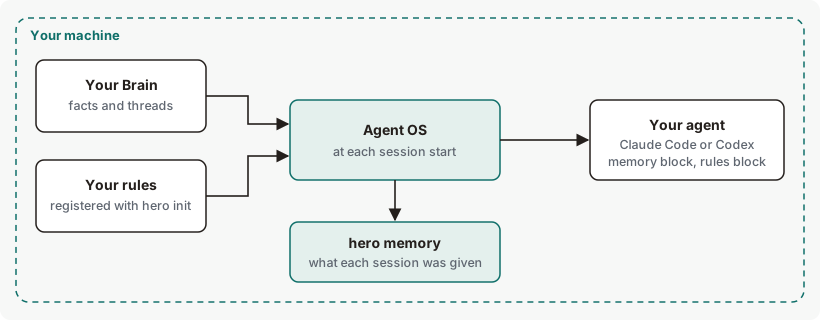
When a Claude Code or Codex session starts, Agent OS gives the agent your registered rules for the project and keeps a receipt of which rule ids it gave, with no rule text. hero memory reads those receipts and your registered rules. It shows only the rules that apply where you run it, so run it inside your project. In some projects the session-start rules block can be missing or incomplete. Every selected rule is given, including rules registered from the agent's own CLAUDE.md or AGENTS.md. If the rule registry can't be read, the session gets an error notice, followed by this project's own CLAUDE.md (Claude Code) or AGENTS.md (Codex), labelled as a fallback, when it can be read safely (a regular file of 64 KiB or less, not a symlink). See How context loading works.
Get started with hero memory
Before you start: Agent OS is installed and your rules are registered with hero init. Run these from inside your project. With no rules registered, you'll see no rule registry yet.
See which rules Agent OS gave your agent.
hero memoryYou should see the load audit summary, then either the sessions or
No session injection receipts yet. See Example output.See what would load for a task.
hero memory write a python function and commit itThe first line names the rule topics your words matched. See Example 2.
See the evidence behind each number.
hero memory --detailsThe load audit, then each shared number as numerator/denominator.
Nothing here changes your rules or sessions, so there's nothing to undo.
Example output of hero memory
Rules registered, before any session has started
Output from version 0.1.36rc13 on a demo home; the numbers are examples. Trimmed where you see …
With no rules registered, lines 3 to 5 and 8 are replaced by no rule registry yet — hero init <memory.md>. Once sessions have started, lines 6 and 7 are replaced by the sessions; see Example 1.
How to read hero memory output
| Line | What it means | What to do |
|---|---|---|
| 1. Title | What the screen shows, and the window. all retained: the screen covers every record still kept on this machine, with no time window applied. | Nothing. |
| 2. LOAD AUDIT | The start of the simulation. It says on screen that it isn't what your agent was given. | Nothing. |
| 3. Loaded, pinned, routed out | How many rules the simulation would load, how many of those are pinned critical rules, and how many it routes out, including rules already checked as code. context is the topics used: general unless you give task text. budget is the estimated tokens used out of the budget. | To change the budget, see Files and environment. |
| 4. Pinned criticals | Critical rules loaded, out of all critical rules. Critical rules always load. If they alone exceed the budget, the line adds BREACH and names two ways out. | On a breach, follow the line: have a rule checked as code, or use a larger model. |
| 5. Naive would drop | For contrast, how many rules a plain load in file order would cut silently, and how many of those are critical. | Nothing. It shows what the load audit avoids. |
| 6. Receipts | No session start has been recorded, so whether your rules reach your agent isn't verified. | Start a session in Claude Code or Codex, then run this again. |
| 7. Freshness | Rules are given at session start; one you register mid-session reaches the next session. | Start a new session after registering a rule. |
| 8. Every simulated rule | Each rule by id: loaded, or routed out with the reason. Reasons include not relevant to context, over budget and covered by code. | over budget: raise the budget (see Files and environment), or move mechanical rules to code. not relevant to context: name the rule's topic in the task text, or mark the rule critical, since critical rules always load. covered by code: nothing, the rule is already checked as code. |
More hero memory examples
Example 1. To check that your rules reach your sessions
hero memoryExcerpt: the receipt view, after sessions have started.
Example output. The format is the command's; the numbers are examples.
IS IT LOADING
  ✓ Claude Code rules carried on 4 of 4 sessions · last 2 h ago
  ✓ Codex       rules carried on 2 of 2 sessions · last 1 day ago
  Rules are current as of session start; rules registered mid-session reach the next session.
  Counts are SessionStart emissions; resume or compaction may repeat a session.

CRITICAL RULES — importance, never recency
  2 critical rules · 0 enforced at the tool call · 2 given to the model (2 mechanical, not armed yet)

RULE SELECTION — all active rules for this project and user
  No scene detection or relevance ranking; display overflow is separate from active-rule selection.
  Critical-rule coverage is not verified by these receipts; they record emitted rule IDs only.

RECENT SESSIONS| Section | What it means |
|---|---|
| IS IT LOADING | Per agent, how many session starts carried your registered rules. ✓ means all of them; ! means some didn't, with the reason on the next line. A ✗ line means a session had more mechanical rules than fit, and the extras were neither in context nor checked as code. |
| CRITICAL RULES | Your critical rules, split into those armed at the tool call and those given to the model as context. With none, it says how to mark one. |
| RULE SELECTION | How sessions get rules: the active rules for the project and for you, with no ranking by relevance. |
| RECENT SESSIONS | The five newest sessions: when (UTC), the session id (whole up to 14 characters, otherwise its first 8, lengthened until it names one session, so hero trace show opens it; an id too long for the column prints under the table as [1] <id>, with see [1] in the cell), the agent, the number of starts, and the rules given per start. hero memory list shows them all, and hero trace show <session> replays one. |
Example 2. To see what would load for a task
hero memory write a python function and commit itExample output. The format is the command's; the numbers are examples.
memory — context manager
  your task → rule topics: coding, writing (from: commit, function, python, write) — rules on other topics are routed out unless pinned
  loaded 4 · pinned 2 · routed out 2 · context coding, writing · budget 46/30,000 tokens
  pinned criticals: 2/2 loaded
  naive would drop: 0 silently · 0 critical
  loaded rules:
    · never-forcepush-to-main
    · never-commit-secrets-or
    · write-docs-in-plain
    · use-snakecase-for-python
  routed out:
    · always-run-the-tests: not relevant to context
    · keep-database-migrations-reversible: not relevant to context
  context_load_candidates 6/6
Your task text isn't echoed: only the words that matched a topic are. When your words match no topic, the first line reads:
your task named no rule topic (email, writing, coding, safety, scheduling, data, social) — only pinned rules and rules tagged general loadcontext_load_candidates is the rules eligible under the budget, out of the rules registered.
Example 3. To see what happens when critical rules exceed the budget
HERO_MEMORY_MAX_TOKENS=20 hero memoryExcerpt: the load audit summary.
Example output. The format is the command's; the numbers are examples.
  loaded 2 · pinned 2 · routed out 4 · context general · budget 22/20 tokens
  pinned criticals: 2/2 loaded · BREACH: 2 tokens over the 20-token budget —
    convert a guard to code or route to a larger model
  naive would drop: 5 silently · 1 critical
Critical rules still load, over the budget. A breach doesn't change the exit code.
Example 4. To see every session
hero memory listBefore any session has started:
Example output. The format is the command's; the numbers are examples.
Memory · every session · all retained
  No session injection receipts yet — registered rules reaching your agent are not verified.
  Rules are current as of session start; rules registered mid-session reach the next session.
With receipts, it prints the RECENT SESSIONS table with every session, not only the newest five.
Example 5. To use the numbers in a script
hero memory --jsondata holds the load audit (loaded, pinned, dropped, loaded_ids, routed_out, context_tags) and, under given, the receipt view: sessions, critical_rules and registry_only_rules, the rules you stated only in chat. The sessions in JSON are under data.given.sessions; list --json returns the rule registry's record instead.
Exit codes and errors for hero memory
| Code | Meaning | What to do |
|---|---|---|
0 | Every successful view, including a BREACH, describe and help. | Nothing. |
2 | Refused: an unknown flag, an argument a subcommand doesn't take, or enable or disable. | Check the synopsis and the errors below. |
3 | A source it needs can't be read: your registered rules, the receipts, or Agent OS's local record. | See the errors below. |
A refusal prints refused, reason, governing_rule and remedy, or the same as JSON with --json.
| Error | Cause | Fix |
|---|---|---|
memory has no flag '<flag>' | A flag other than --json or --details. | Use one of those two. |
memory is not configurable | hero memory enable or disable. | Nothing to turn on or off; run hero memory. |
memory list does not take '<word>' | Extra words after list. | Run hero memory list alone. |
memory describe takes only --json (got '<flag>') | Another flag on describe. | Use --json or nothing. |
memory list takes no --cursor in V0 (next_cursor is emitted, not consumed) | --cursor on list. | Leave it out. |
cli.memory failed at runtime (JSONDecodeError) | Your registered rules aren't valid JSON. Exit 3. | Check that your registered rules are valid JSON. |
Files and environment for hero memory
| Name | Kind | Purpose |
|---|---|---|
| Your rules file | File you write, registered with hero init | The rules hero memory reports on. |
HERO_MEMORY_MAX_TOKENS=<n> | Environment variable | The load audit's token budget. Default 30000. It doesn't change what your agent is given. |
HERO_MEMORY_MAX_ENTRIES=<n> | Environment variable | The load audit's rule budget. Default 200. |
HERO_BEACON=off | Environment variable | Each read can send the usage beacon without waiting on it. Usage reporting is on by default. It sends metadata only — never content, prompts or responses — at most once a day. Turn it off with HERO_BEACON=off. |
Limits of hero memory
| Limit | Behaviour | Can you change it? | What to do |
|---|---|---|---|
| The load audit is a simulation | It routes by topic within a token budget. Sessions get the active rules within the rules block's own limit. In some projects the session-start rules block can be missing or incomplete. Their numbers differ. | No | For what a session got, read the receipt view. |
| Where you run it | Project rules show only when you run it inside that project. Elsewhere the audit can read loaded 0. | No | Run it from your project. |
| Unknown words | A word that isn't a subcommand, such as a typo, is read as task text, and the load audit runs over it. | No | Check the spelling of the subcommand. |
| Topic matching | A fixed set of topics. A task that names no topic loads only critical rules and rules tagged general. | No | Nothing for your sessions. Topic matching applies only to this load-audit simulation, not to what a real session gets: a session start gives all active rules for the project and user, with no ranking by topic. To simulate a task, include its topic words. |
| Token counts | The budget uses an estimate, not a tokenizer. | No | Nothing. |
| Budget values | A value that isn't a whole number resets both budgets to their defaults, with no message. | Yes | Use a whole number. |
| Critical-rule coverage | Receipts record the rule ids given, so whether a critical rule reached every session is shown as not verified. | No | Mark the rule critical (risk_class: critical, or write it as "never … <sensitive target>") so it's pinned, or have it checked as code with hero codify. |
| Where receipts come from | Only a session start writes them. No hero memory command does. | No | Start a session in Claude Code or Codex. |
list and list --json | The text shows sessions; the JSON shows the rule registry's record. | No | For sessions in JSON, use hero memory --json. |
--details output | It prints context_load_candidates twice, and can list rate_card_stale, which is about pricing. | No | Nothing. |
Commands related to hero memory
hero memory reports on.
hero enforceWhich rules are checked as code at the tool call.
hero brainYour Brain, including your memory file.
hero traceReplay a session named in RECENT SESSIONS.
Checked against Agent OS 0.1.36rc14 (build 599c5e120c18) on 17 Nov 2026.