hero route
Shows which model served each of your agents' model calls, which calls moved, and where your tokens went.
What hero route does
It answers one question: what did routing do with my agents' model calls? It reads the record Ekamyth Agent OS keeps on your machine of each call, and shows the requested model, the model that served it, and whether the call moved. hero route census answers a second question: which of my agents send their calls through Agent OS at all?
- Use it when you want to see which models answered your agents, check that a call moved or stayed, or confirm that Claude Code and Codex go through the model gateway.
- Use something else when you want cost across every lever (
hero efficiency), what one session did step by step (hero trace), or one overall read with fixes (hero health). - Alias: none.
- Reads or changes: every subcommand reads and writes nothing.
censusreads your agents' settings and asks the model gateway whether it's answering. Data reads can send a content-free usage beacon; see Files and environment. To turn routing off, see Routing off.
Each row is one metered record, not a distinct call. Lines with no evidence behind them print not measured with a reason, never $0. Cost is an estimate at public list prices, unless HERO_BILLING_RATES points at your own rate card. The output says which.
Synopsis for hero route
hero route [status] [--since <time>] [--all] [--only <word-or-model>] [--json] [--details]
hero route list [--since <time>] [--all] [--only <word-or-model>] [--json] [--details]
hero route census
hero route describe [--json]
hero route help
Run with no subcommand, it behaves as status. hero route -h is the same as --help.
Subcommands of hero route
| Subcommand | What it does | Reads or changes |
|---|---|---|
status | Whether routing is working, what moved, where your tokens went, which models ran each kind of work, and the newest 20 records. It asks the model gateway whether it's answering. This is the default. | Reads |
list | The same view, titled Route · newest <n> records, without asking the model gateway. Up to 200 records with --all. Totals always cover the full window. | Reads |
census | Whether this install's model gateway is answering, the calls it logged in the last 24 hours, and, for each known agent, whether it sends calls through the gateway. | Reads |
describe | The command's own descriptor. Reads none of your data and sends no beacon. | Reads |
help | This command's help. Same as --help and hero help route. | Reads |
Arguments for hero route
Arguments for status and list
| Argument | Type | Required | Default | What it does |
|---|---|---|---|---|
--since <time> | A UTC instant, <n>h, <n>d or today | No | Last 24 hours | Shows records from that time until now, up to 30 days ago. A UTC instant must have offset zero, such as 2026-11-04T00:00:00Z. today means 00:00 UTC. Attribution reads as unverified. |
--json | Flag | No | Off | Machine-readable output with data and envelope. list --json adds next_cursor. JSON never asks the model gateway. Combines with --details. |
--details | Flag | No | Off | Shows every shared number as numerator/denominator, with the reasons a figure is partial. |
hero route --help also lists --session. See Limits.
More arguments for status and list
| Argument | Type | Required | Default | What it does |
|---|---|---|---|---|
--all | Flag | No | Off, newest 20 | Shows every record up to 200. Totals always cover the full window. |
--only <value> | violations, blocked, failed, or a model name | No | Off | Filters the list of records. A model name must be a model Agent OS knows, and matches records where it was the requested or the served model. Text view only: with --json it's refused. See Limits for the three words. |
Arguments for census
None. Any argument, including --json, is refused with exit code 2.
How hero route gets its answers
Agent OS keeps a record of each model call on your machine: the requested model, the model that served it, whether it moved, the kind of work, tokens and estimated cost, with no prompt or response text. hero route reads that record, prices the calls against the rate card, and prints the result. status in your terminal also asks the model gateway whether it's answering, so it can say whether routing is working. list and every --json call skip that check. For the whole picture, see How routing works.
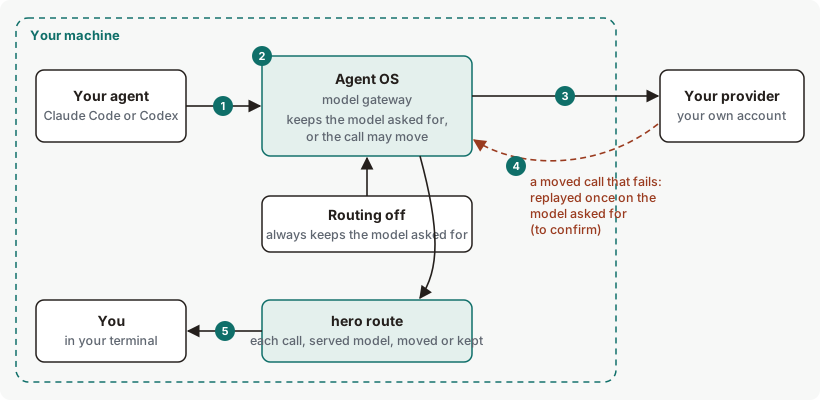
hero route shows is what happened to your own calls.Get started with hero route
Before you start: Agent OS is installed and you've run hero setup. With no calls recorded yet, the summary says No model calls yet.
Check that your agents send their calls through Agent OS.
hero route censusYou should see each known agent with a mark and the evidence for it. After
hero setup,claude-codeandcodexshould read✓ VIA-PROXY. See Example 1.See recent calls and what routing did.
hero routeYou should see the window, whether routing is working, what moved, where your tokens went, and the newest records. See Example output.
See every record in the window.
hero route list --allYou should see up to 200 records, and totals for the full window.
Nothing here changes your work, so there's nothing to undo.
Example output of hero route
Output from version 0.1.36rc13, from a test run of four model calls through a local test server. Lines are left out where you see …; no number is changed. Dollar figures are left out.
When net saving can be measured, hero route shows it at public list rates; otherwise it says "not measured". The Net saving line prints Net saving at public list rates: $<n>, or Additional cost at public list rates: $<n> when the moves cost more. Both are estimates, not invoice or subscription savings.
When a call that was moved to another model fails, the savings figure can overstate. The 'net saving at public list rates' figure can also overstate savings when calls move because a model was unavailable. Treat it as an estimate.
How to read hero route output
Lines 5 and 8 aren't in the excerpt above. The run had too few records for line 5, and line 8 is left out because it holds token totals.
| Line | What it means | Where it comes from | What to do |
|---|---|---|---|
| 1. Window | The window every figure covers, last 24 hours by default. partial means some figures aren't fully measured. | Your local call record. | Use --since for another window, or --details to see what's partial. |
| 2. Recent | The newest records. Each row is one metered record, not a distinct call. | Your local call record. | Use --all to expand recent detail to at most 200 records, or --since <when> to choose a time window. |
| 3. A kept call | When, the kind of work (see line 9), the model that served it, and its cost. (kept) means the requested model served it. — means the cost wasn't recorded, and <$0.01 means less than a cent. | Your local call record, priced on the rate card. | A kept call used the requested model; the kept status alone requires no action. |
| 4. A moved call | The model that served it and the model your agent asked for, then a reason word, such as reason right_sized. right_sized: moved to a smaller model because measured evidence says it does this kind of work as well. cost-min: moved to the lowest-priced model that meets the call's needs. best-fit-fallback: chosen by capability and price, because there's no quality measurement for this kind of work yet. It isn't a failover. | Your local call record. | A moved call needs nothing from you. Read the reason word on the line. To stop moves, set HERO_ROUTE=0 (all moves), HERO_ROUTE_LADDER=off (keeps only the background moves) or HERO_ROUTE_CLASSIFY=0 (every move based on the kind of work). |
| 5. Older | How many older records the list leaves out. | Your local call record. | Use --all or --since. |
| 6. Is it working | Whether routing is on and the model gateway is answering, and how many records changed model. | Your local call record and the model gateway. | If the gateway isn't answering, start it. |
| 7. What it downgraded | Moves, and their estimated effect at public list prices or your rate card. | Your local call record and the rate card. | Read the figures as estimates, not invoice or subscription savings. The header's saving is gross: saved on calls moved to a cheaper model, same tokens, or cost ? when no priced baseline was recorded. A row's saved cell is a ~ estimate unless it is reconciled, or it reads not enacted, failed, outcome ? or cost ?. When nothing moved, the section reads nothing downgraded — <why>. |
| 8. Where your tokens go | Input and output tokens by the model that served the calls, with the estimated spend at public list prices or your rate card. | Your local call record, priced on the rate card. | For cost across every lever, run hero efficiency. |
| 9. Models by task class | How many records each model served for each kind of work. The kind of work Agent OS inferred for each call. | Your local call record. | No action is required for this table alone. |
| 10. Review routing coverage | Commands to narrow the view. | The report. | Run one. |
More hero route examples
Example 1. To check which agents go through Agent OS
hero route censusExample output. The format is the command's; the numbers are examples. Excerpt: paths are shortened, and lines left out are marked ….
hero route census — what routes via the proxy, what bypasses it

  proxy state
    :18500  UP       this install's Runtime — healthz ok
    …

  traffic via proxy (last 24h)
    none recorded in the structured log

  known surfaces
    ✓ claude-code     VIA-PROXY  base URL points at this install's Runtime (http://127.0.0.1:18500)
      evidence: …/.claude/settings.json
    …
    ✓ codex           VIA-PROXY  base URL points at this install's Runtime (http://127.0.0.1:18500/v1)
      evidence: …/.codex/config.toml
    …
    ? cloud-sessions  UNKNOWN    cloud session routing is not derivable from this machine
      evidence: (no local evidence)

  2 of 5 known surfaces route via proxy.
Each agent reads ✓ VIA-PROXY or ? UNKNOWN, with the file or setting that shows it. UNKNOWN always comes with its reason.
Example 2. To see every record in a time range
hero route list --since 6h --allThis prints the records from the last six hours, up to 200, with totals for the whole range. With nothing recorded, the window line reads <time> → now · unavailable and adds attribution unverified — since_window_not_session_bound.
Example 3. To see the calls one model handled
hero route --only claude-sonnet-5This lists the records where claude-sonnet-5 was the requested or the served model.
Example 4. To use the numbers in a script
hero route --jsonIts data holds headline, the title line; runtime_answering, which is null because JSON doesn't ask the model gateway; policy, which reads "unknown" for the same reason; and next_step, null unless one applies. list --json puts the records in data and adds next_cursor.
Routing off
Start or restart the model gateway with HERO_ROUTE=0 in its environment to turn automatic routing off.
Exit codes and errors for hero route
| Code | Meaning | What to do |
|---|---|---|
0 | The output asserts a positive result, or is advice with no verdict. | Nothing. |
1 | A truthful negative result. | Read the output. |
2 | Refused: unknown flag or subcommand, missing argument, not configurable, or unavailable. | Read the governing_rule line and run the remedy, usually hero route --help. See the errors below. |
3 | A source it needs is unavailable at runtime. | Email support at the address in your welcome email, with the output you saw. |
| Error | Cause | Fix |
|---|---|---|
route has no verb '<word>' | An unknown subcommand. | Check the synopsis. |
route has no flag '<flag>' | An unknown flag. | Check the synopsis. |
route is not configurable | An attempt to switch hero route on or off. | None. See Routing off. |
route selectors apply only to status and list | --since or --session was used with another subcommand, such as census. | Use them with status or list. |
invalid_since, invalid_window | --since isn't a form it reads, such as yesterday or a +02:00 offset, or is more than 30 days ago, such as 40d. The rule reads Route selection requires a UTC instant within 30 days, or repeatable sessions; narrow the window for a query limit. | Use a UTC instant, <n>h, <n>d or today, within 30 days. |
route describe takes only --json (got '<flag>') | describe was given another flag. | Use hero route describe --json. |
--only must be violations, blocked, failed, or a model name (got '<value>') | --only was given something else. | Use one of the three words or a model name. |
hero route census: unexpected argument(s): <args> | census was given an argument, such as --json. | Run hero route census with no arguments. |
Files and environment for hero route
| Name | Kind | Purpose |
|---|---|---|
HERO_BILLING_RATES | Environment variable | Path to your own rate card. Cost and saving figures use it. Without it, figures are at public list prices, and the output says so. See Use your own rates. |
HERO_PROXY_PORT | Environment variable | The model gateway port that status and census check. Default: this install's port, otherwise 8081. |
HERO_BEACON=off | Environment variable | Data reads can send the usage beacon. Usage reporting is on by default. It sends metadata only — never content, prompts or responses — at most once a day. Turn it off with HERO_BEACON=off. |
HERO_HOME | Environment variable | Root of Agent OS's files on your machine. Default ~/.hero. |
~/.claude/settings.json, ~/.codex/config.toml | Files, read by census | Your agents' settings, which show whether each one points at the model gateway. |
Limits of hero route
| Limit | Behaviour | Can you change it? | What to do |
|---|---|---|---|
| Window | Last 24 hours by default. --since goes back 30 days at most. | Up to 30 days | Use --since. |
| Rows shown | The newest 20 by default, 200 at most with --all. Totals always cover the full window. | Up to 200 | Use --all or a shorter --since. |
--session | Calls aren't linked to sessions, so it shows no data for a session. The output says session binding not installed. | No | Calls are not linked to sessions in this routing report, so session-level results are not measured. |
--only violations, blocked, failed | Routing records carry no blocked or failed outcome, so these match nothing. | No | Use a model name, or see refusals in hero trace. |
| Failed and fallback calls | A call that failed, was refused or fell back can read as (kept). | No | See refusals in hero trace. |
| Models routing doesn't know | A call to a model routing doesn't know is not moved and has no list price. Its spend can read ~$0.00 metered spend, which is not its real cost. | No | Read the No public list price line for the models this applies to. |
| Busy record | Under heavy load, hero route --since 1h can be refused with query_limit. | No | Run it again, or use a shorter window. |
| Calls refused before sending | hero route list can name a model as having served a call that Agent OS refused before sending it, for example when no agent session was ready or sign-in failed. | No | See refusals in hero trace. |
census traffic | census can show no traffic even when calls were routed. | No | Use hero route to see the calls. |
census errors | An error from census goes to the terminal's error output, not as a refusal object. shell-sessions reports only the shell you run it in. | No | Run census from the shell you want checked. |
| Lines with no evidence | Many summary lines read not measured, some with a raw reason code. | No | Use --details to see the reason for each. |
/hero:route in your agent | Installed by setup. | No | Run hero route in your terminal. |
How calls may move
Which calls may move
Routing sends each kind of work to the least expensive model we expect to do it well, and it keeps learning from outcomes. Every call shows the model you asked for and the model that answered, so you can always see what happened. Every call that moved comes with a receipt, and hero route lists it with its reason. For Codex calls, hero route also shows how they're handled on its Codex agentic floor line, for example:
Sample output (simulated data). One line of hero route.
Codex agentic floor: off — native Codex keeps the requested model (HERO_ROUTE_CODEX_AGENTIC_FLOOR_TIER is not set on the Runtime)Commands related to hero route
Checked against Agent OS 0.1.36rc14 (build 599c5e120c18) on 17 Nov 2026.