How Ekamyth Agent OS works
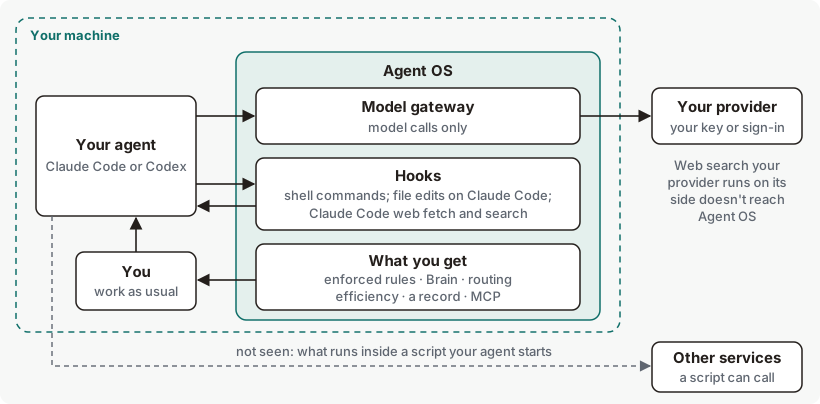
Agent OS is the operating system layer for the AI agents you already use, Claude Code and Codex, on Mac and Linux. It runs on your machine, between your agent and your model provider.
How does Agent OS work?
Agent OS doesn't replace Claude Code or Codex, and you keep your own provider account. It connects to your agents in these ways, all on your machine:
- The model gateway. Your agent's model calls pass through it on their way to your provider.
hero setuppoints Claude Code and Codex at it. - Hooks in Claude Code and Codex. At set moments, such as before it runs a tool, your agent calls Agent OS and waits for the answer. Setup wires 5 hooks in Claude Code and 6 in Codex.
- The MCP wrapper.
hero mcp wrap <server>sits in front of one of your local MCP servers and checks each call before it reaches that server. You set it up per server, in your agent's MCP configuration. See How MCP works. - Skills inside your agent.
hero setupinstalls 12 skills:/hero:slash commands in Claude Code, and the same skills in Codex. See Commands inside your agent. - The
herocommands. In your terminal, they show you what Agent OS recorded and let you change what it does. See Reference.
You keep working in your agent as usual. Agent OS checks tool calls against your rules, gives a new session context from your Brain and your rules, routes model calls, and records what happened. In some projects the session-start rules block can be missing or incomplete. You see and control it with hero commands in your terminal. hero setup makes both connections after showing you its plan, and hero setup --undo takes them back out.
Agent OS concepts
| Term | What it means |
|---|---|
| Model gateway | The part of Agent OS your agents' model calls pass through on the way to your provider. It listens only on your own machine. The command that starts it is hero proxy, and command output, such as hero status, calls it the proxy. See How Agent OS connects. |
| Hook | A moment in a Claude Code or Codex session when the agent calls Agent OS and waits for its answer, such as before it runs a tool. See what each connection covers. |
| Rules file | A markdown file you keep your agent's rules in, such as CLAUDE.md or AGENTS.md. See How Governance works. |
| Posture | How Agent OS treats tool calls your rules don't cover. Every install starts on the builder posture. |
| Brain | What Agent OS keeps about you and your work, on your machine. See How the Brain works. |
| Lever | A check Efficiency makes for a kind of waste in your agents' work. See How Efficiency works. |
| Record | What Agent OS keeps on your machine about what your agents did, which hero trace, hero health, hero route and hero efficiency read back to you. |
What you get
Agent OS gives the agents you already use the services of an operating system. Each row links to how that area works.
| What you get | What it does for you | Where you see it |
|---|---|---|
| Rules checked as code | A rule in your rules file written in one of the shapes Agent OS checks as code, such as "Never push to main.", is checked at the tool call, on Claude Code and for shell commands on Codex. It blocks once enforcement is on. A rule in other wording reaches the agent in context, as guidance. A short list of dangerous command shapes is always refused. A send, post or delete through a connected tool is held until you approve it, when the call reaches the hook. Codex doesn't send most MCP calls to the hook reliably. Through the tool calls that reach the hooks, your agent can't switch off its own rules. | hero init, hero enforce, hero govern, hero inbox |
| A Brain | Keeps the facts you ask it to remember, such as with a prompt that starts "Remember that ...", on your machine. When a session starts, your agent gets the part that fits the current project, as context, with your rules for the project in a separate block. Claude Code and Codex use the same Brain, so you can save a checkpoint of your work in one and pick it up in the other. See Moving work between Claude Code and Codex. | hero brain, hero memory |
| Model routing | Routing is on after setup. For each model call, Agent OS keeps the model your agent asked for, or the call may move to another model; either way it still goes to your provider with your own key or sign-in. Sub-agent tasks and background helper calls may move to a smaller model. Routing decides each call by its own kind of work, not by your whole task or session. For Codex, see Codex routing. | hero route |
| Efficiency | Shows what your agents' work costs and looks for waste across the whole of the work, not only model choice: retries, mechanical rules still running on a model, repeated requests that a cache would skip, oversized output, extra reasoning effort, and more. The levers report; you choose what to change. | hero efficiency |
| A record you can read | Records what your agents do in each session, gives one read of how they're doing with a fix for each finding, and runs standing checks for you on a cadence. The hero trace summary counts model calls alongside tool calls, in a line like 34 tool calls · 2 model calls. | hero trace, hero health, hero schedule |
| MCP | By default, your agent's MCP tool calls reach Agent OS through the hooks, like its other tools: on Claude Code, and when the call reaches the hook on Codex. For a server you want each call checked before it reaches the server, set up the MCP wrapper, hero mcp wrap <server>, one server at a time. Agent OS also has a small MCP server of its own. Agent OS doesn't provide an MCP SDK. | hero mcp |
What each connection covers
The model gateway carries model calls only. Your agent's tools reach Agent OS through the hooks. Some things reach neither.
| What your agent does | Model gateway | Hooks |
|---|---|---|
| Calls a model | Passes through | None |
| Runs a shell command | None | Seen before and after the call, on Claude Code and Codex |
| Reads, writes or edits a file | None | Seen on Claude Code. Codex doesn't send file edits to the hook reliably. |
| Fetches a page or searches the web in Claude Code | None | Seen as a tool call, and let through |
| Uses a web search your provider runs on its side | Doesn't reach Agent OS | Doesn't reach Agent OS |
| Calls an MCP tool | None | Seen as a tool call. |
| Runs a script or program | None | The command is seen. What runs inside it isn't, so a script can call a service directly. |
What leaves your machine
Your prompts and your agent's responses go to your own model provider, as they did before. Agent OS's own record of each model call holds no prompt or response text.
What Agent OS itself is built to send to Ekamyth is a declared list. None of the flows hero privacy lists carries your prompts or your agent's responses. Some sends happen outside the declared list; they're listed in Limits. hero privacy lists the declared flows and which are on, and shows the sends its egress guard recorded. Four flows send without the guard, so they're never in that record. See How Privacy works.
Nothing expires on its own. Agent OS cleans up its records only when you run hero prune, which archives old traces and old model-call records. It never prunes your attest record, and it leaves your Brain's files alone.
When something goes wrong
| What happens | What you see | What happens to the work |
|---|---|---|
| The model gateway stops | When you send a prompt while it's down, the prompt isn't sent, and the message names the command that starts it. It runs as a background service that restarts itself. | Model calls from a connected agent fail until it's back. |
| Agent OS can't read your registered rules | If Agent OS can't read your rules, it refuses tool calls until it can, whether or not enforcement is on. The refusal says how to fix it. | Fix what the refusal names. |
| Your policy file is damaged | An always-refused call is refused with a message naming hero govern as the remedy. | Fails open, except the always-refused shapes, which are still refused. |
| A safety check on a tool call doesn't answer in time | On Claude Code, a check stopped at Claude Code's 15-second hook limit lets that one call run unchecked. On Codex, the call is refused with a message naming hero setup --check. | See When part of Governance fails. |
| Your Brain or your rules can't be loaded at session start | The block that failed says so, in place of its content. In some projects the session-start rules block can be missing or incomplete. | The session still starts. |
For symptoms and fixes, see Troubleshooting. Start with hero status.
Agent OS on Claude Code and Codex
| Claude Code | Codex | |
|---|---|---|
| Model calls through the model gateway | Yes, set by hero setup | Yes, set by hero setup |
| Hooks | 5 | 6. Codex approves them through its own hook approval. The end-of-turn hook needs Codex 0.114.0 or later. |
| Rules from your rules file | Checked as code at the tool call; refused once enforcement is on | Checked as code at the tool call, for shell commands; refused once enforcement is on. |
| Slash commands | 12 /hero: commands | 12 skills |
| Session memory at session start | Yes | Wired by setup. |
| A reply that conflicts with your recorded facts | Agent OS asks the agent to fix the reply. | You see a warning. The agent isn't asked. |
What you can change
| Setting | Default | Effect |
|---|---|---|
A line in your rules file, then hero init <file> | Rules read at setup | Adds or rewords a rule. See hero init. |
| Routing off | Routing on | Set HERO_ROUTE=0 in the model gateway's environment, then start or restart the model gateway for it to take effect. See Turn routing off. |
HERO_BRAIN_SESSION_MEMORY=off | On | Stops adding your saved memory at session start. |
HERO_BEACON=off | On | Usage reporting is on by default. It sends metadata only — never content, prompts or responses — at most once a day. Turn it off with HERO_BEACON=off. |
hero setup --undo | Takes Agent OS out of your agents, and drops this machine's activation. See the example. |
See Agent OS for yourself
After you install Agent OS and work in your agent for a while, run:
# Is Agent OS installed, active and connected?
hero status

# Is each agent connected?
hero setup --check

# Which of your rules are enforced, on each agent?
hero enforce

# What did your agents do?
hero trace

# What did the work cost, and where is the waste?
hero efficiency

# What may leave this machine?
hero privacy
Each command's page shows its output and how to read it. See Reference. For short tries with sample output, see Things to try.
Limits and next steps
Checked against Agent OS 0.1.36rc14 (build 599c5e120c18) on 17 Nov 2026.