How routing works
Routing chooses the model that answers each model call your agents make. You see every choice with hero route.
How does routing work?
Routing is one part of how Ekamyth Agent OS runs your agents' work, next to rules, records, verdicts and the other efficiency levers. It's on after setup.
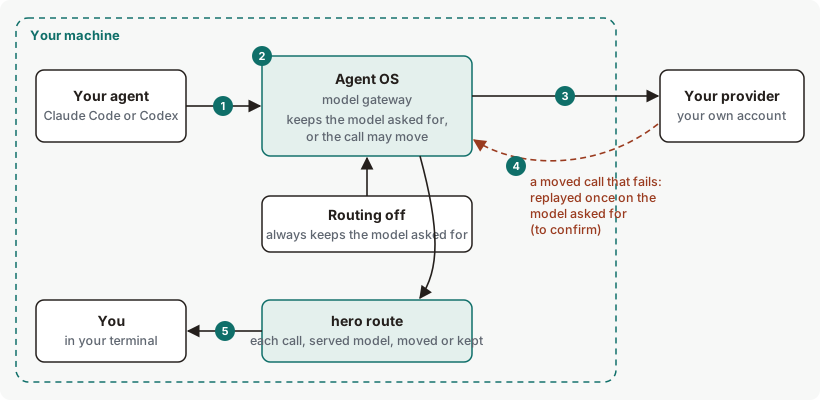
Your agents' model calls pass through the model gateway on their way to your provider. Routing sends each kind of work to the least expensive model we expect to do it well, and it keeps learning from outcomes. Every call shows the model you asked for and the model that answered, so you can always see what happened. The call goes to your provider with your own key or sign-in, and hero route shows you what happened.
Routing concepts
| Term | What it means |
|---|---|
| Model gateway | The Agent OS process on 127.0.0.1 that your agents' model calls pass through. |
| Requested model | The model your agent asked for. |
| Served model | The model that answered the call. |
| Kept | The call was served by the requested model. hero route prints (kept). |
| Moved | The call was served by a different model. hero route prints the model your agent asked for, then a reason word, such as reason right_sized. right_sized: moved to a smaller model because measured evidence says it does this kind of work as well. |
| Census | A check of which of your agents send their model calls through this install's model gateway. Run it with hero route census. |
The path of a routed call, step by step
- Your agent makes a model call.
hero setuppointed Claude Code and Codex at the model gateway. - Agent OS chooses the model. With routing on, it keeps the requested model or the call may move. With routing off, it always keeps the requested model. See Turn routing off.
- The call goes to your provider, with your own key or sign-in. Your provider's own limits apply.
- If a moved call fails, Agent OS replays it once on the model your agent asked for.
- You see the result.
hero routelists each call, the model that served it, and whether it moved.
Where you see routing
| Where | What it shows you |
|---|---|
hero route | Recent calls, the model that served each one, which calls moved, and where your tokens went. |
hero route census | Which of your agents send model calls through the model gateway, and which don't. |
hero efficiency | The Route lever and the top model changes, next to the other levers. |
hero health | Routing findings, which point to hero help route. |
/hero:route in your agent | Installed by hero setup. Your agent runs hero route and explains the result. |
How routing chooses a model
- What it considers: each call on its own: what your agent asked for, the kind of work the call is, and what routing has learned about which model does that work well.
- What it can choose: a call may move only where an approved move exists for that kind of call, and only to a cheaper, smaller model from the same provider. How Codex calls may move is covered on the hero route page. Routing doesn't always choose the cheapest model.
- Which models it knows: the current Claude models at public list prices, including Claude Sonnet 5.5, Opus 5.5, Fable 5.1 and Fable 5.2. A call to a model routing doesn't know keeps that model.
- Default: routing is on after setup, and so is the classifier that reads the kind of work. You don't need a setting.
- What you control: routing can be turned off by starting the model gateway with
HERO_ROUTE=0. See What you can change. - Which calls may move: see How calls may move on the
hero routepage.
Routing data, and what leaves your machine
| Data | Where it's kept | Leaves your machine? |
|---|---|---|
| Your model calls | Sent through the model gateway | Yes, to your own provider, as with any call your agent makes. A moved call stays with the provider your agent asked for, unless you ask for model auto or set HERO_ROUTE_LOCAL_MODEL to use a local model. |
| A record of each call: requested and served model, whether it moved, tokens and estimated cost. No prompt or response text. | Your machine | No, not by default. Agent OS sends call records only if you opt in by setting HERO_LEARN_URL. |
Agent OS also keeps a record of each call on your machine: the requested and served model, whether it moved, tokens and estimated cost. It holds no prompt or response text.
When part of routing fails
| What fails | What you see | What happens to the work |
|---|---|---|
| A moved call fails | hero route lists the call as kept. See Limits. | Agent OS replays it once on the requested model, and your agent gets that answer. |
| The routing step itself fails | The requested model serves the call. | The call keeps going. |
Routing on Claude Code and Codex
| Claude Code | Codex | |
|---|---|---|
| Calls pass through the model gateway after setup | Yes | Yes |
Shown in hero route census | Yes, as claude-code | Yes, as codex |
| How calls may move | See Which calls may move. | See How Codex calls may move. |
What you can change in routing
| Setting | Default | Effect |
|---|---|---|
| Routing off | Routing on | Start or restart the model gateway with HERO_ROUTE=0 in its environment to turn automatic routing off. |
HERO_BILLING_RATES=<path> | Public list prices | Points at your own rate card. The cost and saving figures in hero route use it. Without it, figures are at public list prices, and the output says so. See Use your own rates. |
See routing for yourself
Run these on your own machine to watch each step.
# Step 1: which agents send their calls through Agent OS
hero route census

# Steps 2 to 5: recent calls, the model that served each, moved or kept
hero route
To read the output line by line, see How to read the output.
Routing limits and next steps
Routing limits
| Limit | Behaviour | What to do |
|---|---|---|
| A moved call the provider rejects | When the provider rejects a moved call, for example at a rate limit, Agent OS retries it on the model your agent asked for, so your agent still gets an answer. hero route lists that call as kept, and hero route list --only failed doesn't show it. | Read the call in hero trace. |
| Refused calls in the route list | hero route list can name a model as having served a call that Agent OS refused before sending it, for example when no agent session was ready or sign-in failed. | Read the call in hero trace, which shows how it ended. |
| Savings figures | Route savings can show as not measured. When a moved call fails, or calls move because a model was unavailable, the net saving at public list rates figure can overstate savings. | Treat it as an estimate. |
| Monitor's route board | The board can label a step down as "Moved to a larger model" and count failed calls as "Kept". | Use hero route. |
See Limits of hero route.
Checked against Agent OS 0.1.36rc14 (build 599c5e120c18) on 17 Nov 2026.